Cybersecurity
CVE-2025-14353: SQL Injection in WordPress ZIP Code Plugin Exposes Databases
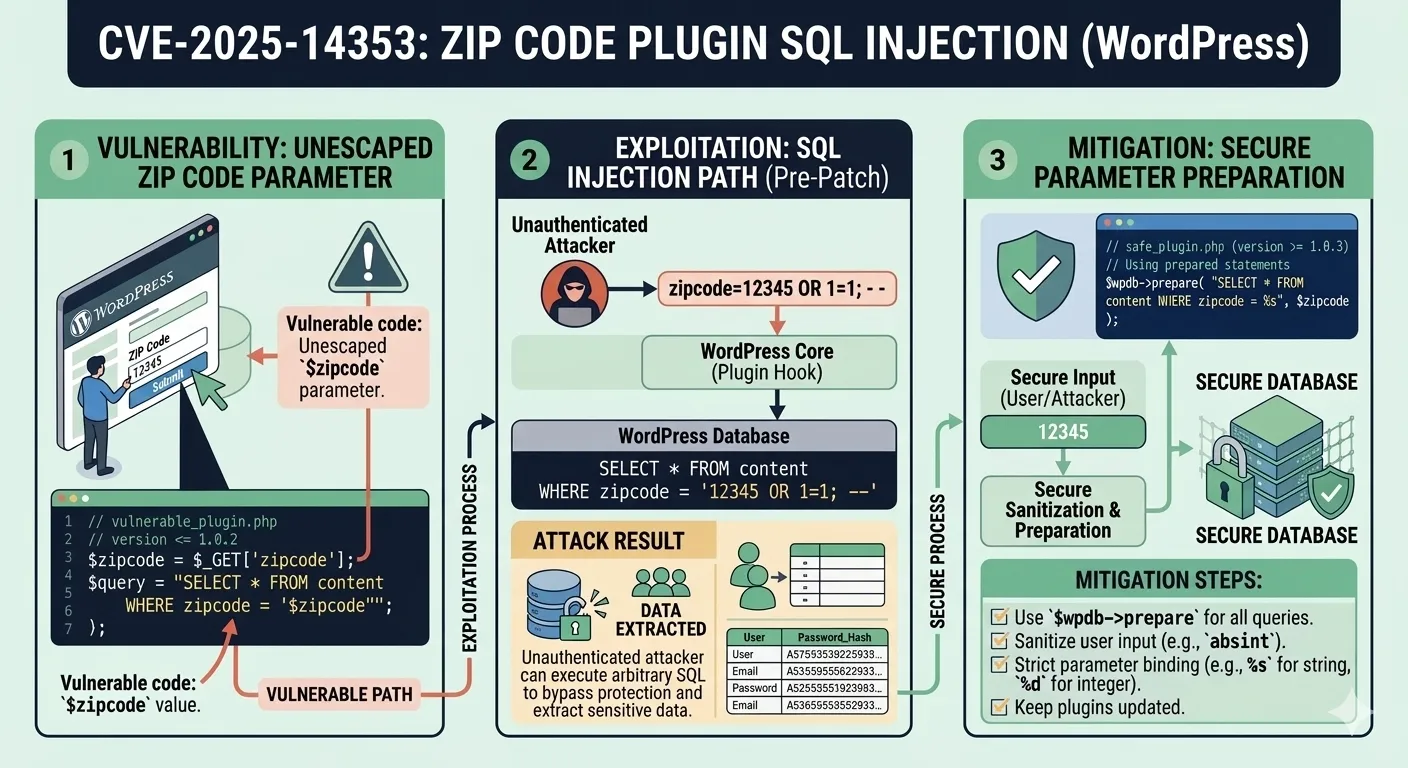
A newly disclosed vulnerability tracked as CVE-2025-14353 has put thousands of WordPress installations at immediate risk. The flaw resides in the ZIP Code Based Content Protection plugin, all versions through 1.0.2, where a classic SQL injection vector through the zipcode parameter allows unauthenticated attackers to extract sensitive information directly from the underlying database. This is not a theoretical concern. The attack requires no authentication, no special privileges, and no user interaction. Any site running this plugin with default settings is a potential target, and the exploitation tooling required is freely available and well-documented.
In this article, we break down the technical mechanics of CVE-2025-14353, examine how the injection works at the code level, explore real-world attack scenarios and their architectural implications, and provide concrete remediation strategies that go beyond simply updating the plugin.
Understanding CVE-2025-14353
CVE-2025-14353 is classified as a SQL injection vulnerability targeting the zipcode parameter in the ZIP Code Based Content Protection plugin. The plugin enables WordPress administrators to restrict content access based on a visitor's geographic location by ZIP code. Visitors enter their ZIP code into a frontend form, and the plugin queries the database to verify whether that code falls within an allowed range. The intended use case is legitimate — geo-restricting content for compliance, marketing, or licensing purposes. However, the implementation fails to apply fundamental input validation.
The Vulnerable Plugin
All versions through 1.0.2 are confirmed vulnerable. The plugin has active installations across small business sites, regional content platforms, and membership-based WordPress deployments. Because the vulnerability requires no authentication, the attack surface is as wide as the plugin's install base. An attacker does not need to know usernames, passwords, or any internal detail about the target site — they only need to locate a WordPress site running this plugin and submit a crafted ZIP code value.
Practical scenario: Consider a regional news site that uses this plugin to gate premium articles by ZIP code. An attacker discovers the site uses the plugin through simple fingerprinting (checking for the plugin's CSS or JavaScript assets in the page source), crafts a malicious ZIP code input, and within minutes extracts the entire wp_users table — usernames, hashed passwords, and email addresses. From there, credential stuffing attacks against other services become trivial.
CVSS Score and Impact Classification
This vulnerability carries significant severity. The attack vector is network-based, requires low complexity, needs no privileges, and demands no user interaction. The primary impact is on confidentiality, as attackers can read arbitrary database contents including user credentials, email addresses, WordPress configuration secrets, and potentially payment information stored in WooCommerce tables or similar e-commerce extensions. The integrity and availability impacts depend on the database user's privilege level — a common WordPress configuration grants the database user enough permissions to not only read but also modify data.
Understanding the severity classification matters for prioritization. If you run any WordPress site with plugins that accept user input and pass it to database queries, this CVE should trigger an immediate audit of your plugin inventory.
How SQL Injection Works in This Context
SQL injection occurs when an application incorporates user-controlled input into database queries without proper sanitization or parameterization. In the case of CVE-2025-14353, the zipcode parameter is passed directly into a SQL WHERE clause, allowing an attacker to manipulate the query's logic entirely.
The Injection Vector: The zipcode Parameter
When a user submits a ZIP code through the plugin's form, the plugin constructs a SQL query resembling the following pattern:
$query = "SELECT * FROM {$wpdb->prefix}zip_codes WHERE zip_code = '$zipcode'";
$results = $wpdb->get_results($query);
The value from the POST request is concatenated directly into the SQL string. No escaping, no type checking, no parameterization. An attacker can submit a crafted value such as:
' OR 1=1 UNION SELECT user_login, user_pass, user_email, 4, 5 FROM wp_users -- This transforms the query into one that returns all user records from the WordPress users table. The single quote closes the original string literal, OR 1=1 makes the initial condition always true, and the UNION SELECT appends data from a completely different table. The double-dash comment (--) neutralizes the rest of the original query.
Vulnerable vs. Secure Code
The difference between vulnerable and secure implementations is stark but surprisingly simple to fix. Below is a comparison of both approaches in the context of WordPress plugin development:
// VULNERABLE: Direct string concatenation
function check_zipcode_vulnerable($zipcode) {
    global $wpdb;
    $query = "SELECT * FROM {$wpdb->prefix}zip_codes WHERE zip_code = '$zipcode'";
    return $wpdb->get_results($query);
}

// SECURE: Using WordPress $wpdb->prepare()
function check_zipcode_secure($zipcode) {
    global $wpdb;
    $query = $wpdb->prepare(
        "SELECT * FROM {$wpdb->prefix}zip_codes WHERE zip_code = %s",
        $zipcode
    );
    return $wpdb->get_results($query);
}
The $wpdb->prepare() method uses parameterized queries, which treat the input as data rather than executable SQL. This single change eliminates the injection vector entirely. WordPress has provided this API since version 2.3 — there is no technical justification for not using it in any plugin released after 2007.
Common developer mistake: Many WordPress plugin developers use $wpdb->query() or $wpdb->get_results() with direct string interpolation because it feels simpler during rapid prototyping. The immediate functionality works, but the security implications are catastrophic. Code review processes that do not specifically audit for $wpdb->prepare() usage on every database-touching function are leaving the door open for exactly this class of vulnerability.
Attack Scenarios and Real-World Impact
Understanding the theoretical mechanics of SQL injection is necessary, but examining realistic attack scenarios reveals the true severity of CVE-2025-14353. The unauthenticated nature of this vulnerability dramatically lowers the barrier to exploitation, making it accessible to script kiddies and automated scanners alike.
Data Exfiltration via UNION-Based Injection
The most straightforward exploitation path uses UNION-based injection. The attacker first determines the number of columns returned by the original query using ORDER BY enumeration, then crafts a UNION SELECT statement that pulls data from high-value tables:
- Column enumeration: Submit
' ORDER BY 1--,' ORDER BY 2--, incrementing until an error reveals the column count. - Table discovery: Query
information_schema.tablesto map the entire database structure, revealing every table name and schema. - Data extraction: Use
UNION SELECTto pull specific columns from target tables likewp_users,wp_options(which stores the site URL, admin email, and secret keys), or WooCommerce order tables containing customer payment details.
An attacker can automate this entire process using tools like sqlmap, which can detect and exploit this type of vulnerability in seconds once pointed at the vulnerable endpoint. The tool automatically handles column enumeration, table discovery, and data extraction — no manual SQL crafting required.
Blind SQL Injection Techniques
If the application does not directly display query results (for example, it only shows a success or failure message based on the ZIP code validation), attackers pivot to blind SQL injection. This CVE supports time-based blind techniques where the attacker injects conditional SLEEP() calls:
' OR IF(SUBSTRING((SELECT user_pass FROM wp_users LIMIT 1),1,1)='$',SLEEP(5),0)-- By measuring response times, the attacker extracts data one character at a time. While significantly slower than UNION-based extraction, this technique works even when error messages and query results are completely hidden from the frontend. A typical password hash can be extracted in under an hour with automated tooling.
Architecture scenario: Consider a WordPress multisite network where the ZIP Code Based Content Protection plugin is network-activated across 50 subsites. A single exploitation on any subsite's form can potentially access the shared database, compromising user data across all 50 sites simultaneously. The blast radius in multisite environments is orders of magnitude larger than a single-site deployment because WordPress multisite uses shared database tables for users and user metadata.
Escalation Beyond Data Theft
SQL injection in MySQL/MariaDB environments (the standard for WordPress) can extend beyond data reading depending on database user privileges:
- File writes via
INTO OUTFILE: If the MySQL user has theFILEprivilege, the attacker can write a PHP webshell directly to the web-accessible directory, achieving persistent remote code execution. - File reads via
LOAD_FILE(): Readingwp-config.phpexposes database credentials, authentication keys, and salts, enabling complete site takeover. - Data modification:
UPDATEstatements can change an admin user's email address, allowing the attacker to trigger a legitimate password reset flow and take over the administrator account. - Stored XSS injection: Inserting malicious JavaScript into database fields that are rendered without escaping creates persistent cross-site scripting attacks against other site users.
Performance consideration: Time-based blind SQL injection attacks generate sustained database load. Each character extraction requires a separate HTTP request with an intentional delay. For sites running on shared hosting or with limited database connection pools, an ongoing blind SQLi attack can cause noticeable performance degradation — effectively turning a data theft attempt into an accidental denial-of-service condition that alerts administrators before the attacker completes their extraction.
WordPress Plugin Ecosystem: A Persistent Attack Surface
CVE-2025-14353 is not an isolated incident. It reflects a systemic problem within the WordPress plugin ecosystem that has persisted for over a decade. Understanding this broader context is essential for building a robust defensive posture rather than playing whack-a-mole with individual CVEs.
Why Plugin Vulnerabilities Keep Recurring
The WordPress plugin directory contains over 60,000 plugins, developed by authors ranging from individual hobbyists to enterprise teams. The barrier to entry is deliberately low — WordPress's open ecosystem is one of its greatest strengths for innovation but also its most significant security weakness. Several structural factors drive recurring vulnerabilities:
- No mandatory security review: Plugins undergo a basic code review before directory listing, but it focuses on compliance with guidelines rather than thorough security auditing. Many SQL injection vulnerabilities pass through undetected.
- Abandoned plugins: Developers abandon plugins without removing them from the directory. Sites continue running unpatched versions indefinitely, accumulating known vulnerabilities.
- Copy-paste development: Plugin developers often learn by copying code from tutorials, Stack Overflow answers, or other plugins. If the source contains insecure patterns like direct string concatenation in SQL queries, the vulnerability propagates across the ecosystem.
- Insufficient API adoption: WordPress provides secure APIs like
$wpdb->prepare(),sanitize_text_field(), and nonce verification. Developers who bypass these APIs in favor of raw PHP database calls introduce entirely preventable vulnerabilities.
The Scale of the Problem
WordPress powers approximately 43% of all websites on the internet. Even a plugin with a modest install base of 1,000 sites represents 1,000 potentially vulnerable targets. The ZIP Code Based Content Protection plugin may not be the most popular plugin in the directory, but its vulnerability is exploitable by anyone with basic SQL injection knowledge and publicly available tooling. The combination of unauthenticated access and direct database extraction makes this one of the more dangerous plugin vulnerabilities disclosed in recent months.
Security researchers have documented hundreds of similar SQL injection vulnerabilities in WordPress plugins over the past five years. The pattern is remarkably consistent: a form field or AJAX endpoint accepts user input, passes it unsanitized to $wpdb->query() or $wpdb->get_results(), and creates a direct injection vector. The fix is always the same — use $wpdb->prepare() — yet the vulnerability continues to appear in newly published plugins.
Detection and Mitigation Strategies
Responding to CVE-2025-14353 requires both immediate tactical actions and longer-term strategic improvements to your WordPress security posture. The following recommendations are ordered by urgency.
Immediate Response
- Verify plugin presence: Check your
wp-content/plugins/directory for the ZIP Code Based Content Protection plugin. Also check inactive plugins — the vulnerability exists in the plugin's code even if it is deactivated but still present on disk. - Deactivate and remove: If you are running version 1.0.2 or below, deactivate the plugin immediately. If a patched version is not available, remove the plugin entirely and find an alternative approach for ZIP code-based content gating.
- Audit database access logs: Review your MySQL/MariaDB slow query log and general query log for suspicious queries containing
UNION,SLEEP,BENCHMARK, orinformation_schemareferences originating from the plugin's request handler. - Rotate credentials: If you suspect exploitation may have occurred, rotate all database passwords, WordPress admin passwords, authentication keys in
wp-config.php, and any API keys stored in the database.
Parameterized Queries and Prepared Statements
For plugin developers and anyone reviewing WordPress plugin code, the remediation is clear: always use $wpdb->prepare() for any query that includes user-supplied data. This is not optional — it is the baseline for secure WordPress database interactions.
The principle applies universally across every language and framework. The following table shows the standard secure pattern for each major platform:
| Language / Framework | Secure Approach | Example |
|---|---|---|
| WordPress / PHP | $wpdb->prepare() | $wpdb->prepare("SELECT * FROM t WHERE c = %s", $val) |
| PHP PDO | Prepared Statements | $pdo->prepare("SELECT * FROM t WHERE c = ?") |
| Python | Parameterized Queries | cursor.execute("SELECT * FROM t WHERE c = %s", (val,)) |
| C# / .NET | SqlParameter | cmd.Parameters.AddWithValue("@c", val) |
| Java | PreparedStatement | conn.prepareStatement("SELECT * FROM t WHERE c = ?") |
| Node.js / mysql2 | Placeholder Queries | connection.execute("SELECT * FROM t WHERE c = ?", [val]) |
Web Application Firewall Considerations
A Web Application Firewall (WAF) provides an additional defense layer but should never be your only protection. Modern WAF solutions like Cloudflare, Sucuri, or Wordfence can detect and block many SQL injection patterns in real-time. However, WAFs have inherent limitations that must be understood:
- Bypass techniques exist: Attackers use encoding tricks (URL encoding, double encoding, Unicode normalization), comment insertion (
/**/), and case manipulation to evade signature-based WAF rules. - False positives: Aggressive WAF rules can block legitimate ZIP code submissions that happen to contain characters the WAF flags as suspicious, degrading user experience.
- Performance overhead: Every request passes through the WAF's rule engine, adding latency. For high-traffic sites, this must be factored into architecture planning and capacity estimates.
A WAF is a valuable component of a defense-in-depth strategy, but it does not replace fixing the vulnerable code. Treat it as a safety net, not a solution.
Long-Term Security Hardening
Beyond addressing this specific CVE, WordPress administrators should implement broader hardening measures to reduce the impact of future plugin vulnerabilities:
- Principle of least privilege: Configure the WordPress database user with only the permissions it needs —
SELECT,INSERT,UPDATE,DELETEon WordPress tables only. RevokeFILE,CREATE,DROP, andGRANTprivileges to prevent file system access and schema modification via SQL injection. - Regular plugin audits: Schedule quarterly reviews of all installed plugins. Remove any that are abandoned, unnecessary, or have known unpatched vulnerabilities.
- Automated vulnerability scanning: Use tools like WPScan or Patchstack to continuously monitor your WordPress installation for known CVEs in plugins, themes, and core files.
- Database activity monitoring: Implement query logging and anomaly detection to catch exploitation attempts before significant data is exfiltrated.
Comparison: Vulnerable Site vs. Hardened Site
| Aspect | Vulnerable Configuration | Hardened Configuration |
|---|---|---|
| Input Handling | Direct string concatenation in SQL | Parameterized queries via $wpdb->prepare() |
| Authentication | No restriction on form submission | Rate-limited and CAPTCHA-protected form |
| Database Privileges | Full privileges including FILE | Least-privilege: only CRUD on WP tables |
| WAF Protection | None | WAF with SQL injection rulesets enabled |
| Monitoring | No query logging | Real-time anomaly detection on DB queries |
| Plugin Management | Install and forget | Quarterly audit with automated CVE scanning |
| Credential Rotation | Never changed after initial setup | Rotated on schedule and after any incident |
Frequently Asked Questions
What exactly is CVE-2025-14353?
CVE-2025-14353 is a SQL injection vulnerability in the WordPress plugin ZIP Code Based Content Protection, affecting all versions up to and including 1.0.2. It allows unauthenticated attackers to inject malicious SQL through the zipcode parameter, potentially extracting all data from the WordPress database including user credentials, configuration secrets, and customer information.
Do I need to be logged in to exploit this vulnerability?
No. This is an unauthenticated vulnerability, meaning any visitor to a site running the vulnerable plugin can exploit it without needing any WordPress account or credentials. This significantly increases the risk because the attack surface includes the entire internet — automated scanners can detect and exploit vulnerable sites at scale.
Is updating the plugin enough to protect my site?
Updating to a patched version closes the specific injection point, but it does not address potential damage already done. If your site was running a vulnerable version in production, you should also audit your database logs for signs of past exploitation, rotate all credentials stored in wp-config.php, and verify that no unauthorized user accounts, data modifications, or PHP backdoors were introduced during the window of exposure.
Can a WAF fully protect me from this vulnerability?
A Web Application Firewall can block many common SQL injection patterns and provides an important defense layer. However, WAFs are not foolproof — skilled attackers can craft payloads that bypass signature-based rules using encoding, case alternation, and comment injection. A WAF should complement secure coding practices and plugin updates, not replace them.
How can I check if my site was already compromised?
Review your web server access logs for unusual POST requests to the plugin's ZIP code form endpoint. Look for payloads containing SQL keywords like UNION, SELECT, SLEEP, or information_schema. Check your MySQL general query log if enabled. Compare your wp_users table against a known-good backup to detect unauthorized account creation or email address modifications. Also scan the file system for recently created PHP files in unexpected locations, which could indicate a webshell was deployed.
Conclusion
CVE-2025-14353 is a clear reminder that even simple, low-profile WordPress plugins can introduce critical vulnerabilities into your infrastructure. The combination of unauthenticated access, direct SQL injection through a trivial form field, and the ability to extract complete database contents makes this vulnerability particularly dangerous. The fix at the code level is straightforward — parameterized queries via $wpdb->prepare() — but the broader lesson is about process and architecture: regular plugin audits, security-focused code reviews, least-privilege database configurations, and layered defenses are not optional for any WordPress deployment handling sensitive data.
If you found this analysis valuable, explore our other cybersecurity vulnerability breakdowns for more in-depth technical coverage on protecting your web applications and infrastructure against emerging threats.
Source
Tags
Share this post
Subscribe
Get the latest posts delivered right to your inbox.



Leave a comment