.NET Development
Unicode digits in .NET: why \d accepts ٣٤٥ and how property-based testing catches it
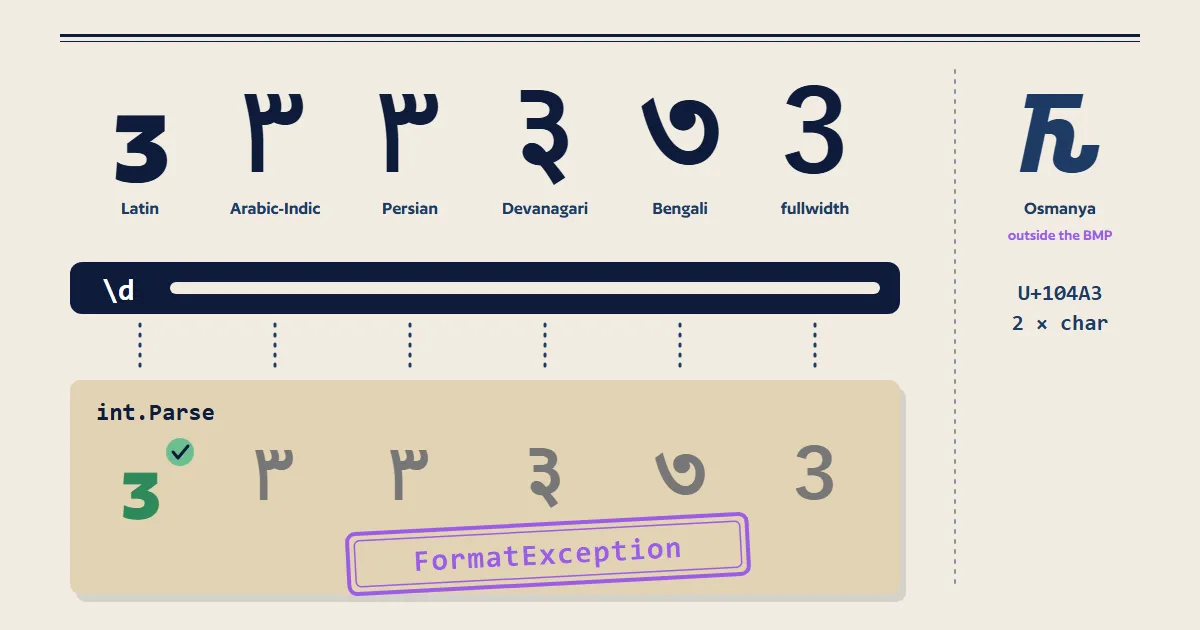
A form asks for a customer number of up to nine digits. The validator uses ^\d{1,9}$, the unit test checks "345" and "abc", and everything is green. Then someone types ٣٤٥, which is 345 in Arabic-Indic digits, and the validator accepts it. Two lines later, int.Parse throws FormatException. The rule that validates and the rule that converts disagree about what a digit is.
This is documented .NET behavior: \d means any Unicode decimal digit, while the Parse methods only recognize 0 through 9. The failure lives in the gap between the two. Example-based tests rarely catch it, because almost nobody writes Bengali digits into their test cases. Property-based testing does: instead of examples, you state a property that must always hold and let a library generate thousands of inputs to break it. Here, CsCheck found the bug and shrank it to a single character. This guide walks through the failure with real .NET 10 output, the property that exposes it, four fixes, and a finding nobody was looking for: int.TryParse accepts a trailing NUL character.
The bug: in .NET, \d isn't [0-9]
According to the .NET documentation, \d is equivalent to \p{Nd}, the Unicode decimal digit category, which covers 0-9 plus the digits of many other scripts. char.IsDigit uses the same category. Unicode recommends that meaning for \d in UTS #18, and Python follows it too.
Counted one character at a time on .NET 10, \d matches 370 char values in the Basic Multilingual Plane; with RegexOptions.ECMAScript, only 10. Walking every code point, the Nd category has 760 of them, 390 outside the Basic Multilingual Plane. Here is the measured behavior, with the same 345 written in several scripts:
| Text | ^\d+$ | ^\d+$ ECMAScript | ^[0-9]+\z | char.IsDigit | int.Parse | c - '0' |
|---|---|---|---|---|---|---|
345 ASCII | yes | yes | yes | yes | 345 | 345 |
٣٤٥ Arabic-Indic | yes | no | no | yes | FormatException | 176169 |
۳۴۵ Persian | yes | no | no | yes | FormatException | 192153 |
३४५ Devanagari | yes | no | no | yes | FormatException | 262083 |
৩৪৫ Bengali | yes | no | no | yes | FormatException | 276291 |
345 fullwidth | yes | no | no | yes | FormatException | 7242873 |
𐒣𐒤𐒥 Osmanya (Somali), 6 char | no | no | no | no | FormatException | 1855784231 |
3٤4 mixed | yes | no | no | yes | FormatException | 16184 |
345\n with a trailing \n | yes | yes | no | no | 345 | 3412 |
This is the exception message, and it's the same with InvariantCulture, ar-SA, fa-IR and hi-IN:
System.FormatException: The input string '٣٤٥' was not in a correct format.Culture doesn't help. fa-IR lists Persian digits in NativeDigits, but the NativeDigits documentation states that the property has no effect on parsing or formatting. The guide to parsing numeric strings sums it up: the only digits parsing methods recognize are the Basic Latin digits, U+0030 through U+0039.
In an API, the typical setup has two layers. DTO validation uses a rule with \d, say a Matches(@"^\d+$"), and the service converts with int.Parse. The field validates, the conversion throws and, if nothing catches the exception, the caller gets a 500 instead of a validation error. That follows from the behavior above; we didn't test it against a real endpoint.
When the conversion doesn't throw: the silent failure
A wrong number is worse than an exception. A hand-written converter built on n * 10 + (c - '0') doesn't throw: it turns "٣٤٥" into 176169, because '٣' is U+0663 and '٣' - '0' is 1587, not 3. Persian digits give 192153 and fullwidth digits give 7242873. char.GetNumericValue does return 3, 4 and 5 for those digits, but using it means accepting the text and converting it, which is a different product decision. This guide is about rejecting it consistently.
Somali digits behave differently in .NET
The Osmanya script, created for Somali, has its digits at U+104A0-U+104A9, outside the Basic Multilingual Plane. In .NET each one takes two char values (a surrogate pair), and that changes the outcome: ^\d$, ^\p{Nd}$ and char.IsDigit(char) reject them, while Rune.IsDigit and char.IsDigit(string, int) accept them. Python's \d, by contrast, matches them and int() converts them. Code that validates by walking the text as Rune values does let them through.
With \d or char.IsDigit, .NET accepts 360 digits that int.Parse rejects, and the ones in the Basic Multilingual Plane are the ones that matter for this bug.
The property that finds it
Property-based testing flips how you test. You don't pick cases: you state something that must hold for every valid input, and the library generates inputs, hunts for one that breaks it and, once it finds one, reduces it to a simpler example that still fails, though not always the smallest. That last step is called shrinking, and it's what turns a random nine-character string into something you understand at a glance.
For this field, the property is: if the validator accepts s, int.Parse(s, NumberStyles.None, CultureInfo.InvariantCulture) doesn't throw and the number is written back exactly as s. The comparison uses n.ToString("D" + s.Length) to keep leading zeros. NumberStyles.None matters: without it, int.Parse accepts whitespace and a sign.
The naive validator and the four fixes live in one static class (Validators.cs):
using System.Globalization;
using System.Text.RegularExpressions;

namespace Digits;

// A "digits only" field of up to 9 digits (fits in an int).
public static partial class Validators
{
    // Naive: \d is any Unicode decimal digit (category Nd), not just 0-9.
    public static bool Naive(string s) => Regex.IsMatch(s, @"^\d{1,9}$");

    // Fix 1: explicit range. \z instead of $: $ also accepts a trailing \n.
    public static bool WithRange(string s) => AsciiRange().IsMatch(s);

    // Fix 2: RegexOptions.ECMAScript makes \d mean [0-9].
    public static bool WithEcmaScript(string s) => Regex.IsMatch(s, @"^\d{1,9}\z", RegexOptions.ECMAScript);

    // Fix 3: no regex. char.IsAsciiDigit is available since .NET 7.
    public static bool WithIsAsciiDigit(string s)
    {
        if (s.Length is < 1 or > 9) return false;
        foreach (var c in s)
        {
            if (!char.IsAsciiDigit(c)) return false;
        }
        return true;
    }

    // Fix 4: validate with the same method that later converts.
    // Careful: TryParse ignores trailing NULs; use the parsed number, not the text.
    public static bool WithTryParse(string s) =>
        s.Length is >= 1 and <= 9 &&
        int.TryParse(s, NumberStyles.None, CultureInfo.InvariantCulture, out _);

    [GeneratedRegex(@"^[0-9]{1,9}\z")]
    private static partial Regex AsciiRange();
}

// The "c - '0'" pattern found in hand-written converters.
public static class HomemadeConverter
{
    public static int ToNumber(string s)
    {
        var n = 0;
        foreach (var c in s)
        {
            n = n * 10 + (c - '0');
        }
        return n;
    }
}
The tests use CsCheck inside xUnit v3. Sample runs the property against the generator and throws if it fails, so it works inside any [Fact] (DigitProperties.cs):
using System.Globalization;
using CsCheck;
using Xunit;

namespace Digits;

public static class Generators
{
    public static readonly Gen<char> AsciiDigit = Gen.Char['0', '9'];

    // Any char in the Basic Multilingual Plane (BMP): includes the plane's 370 Nd digits.
    public static readonly Gen<char> AnyChar = Gen.Char['\0', '\uffff'];

    // 8 out of 10 characters are 0-9, so many strings pass the validator
    // and the property gets to check the conversion.
    public static readonly Gen<char> Mix =
        Gen.Frequency((8, (IGen<char>)AsciiDigit), (2, AnyChar));

    public static readonly Gen<string> Input = Gen.String[Mix, 1, 9];

    // Shows the code points in the failure message.
    // Control characters are written as \uXXXX so they are visible.
    public static string Show(string s) =>
        $"\"{string.Concat(s.Select(c => char.IsControl(c) ? $"\\u{(int)c:X4}" : c.ToString()))}\" " +
        $"({string.Join(" ", s.Select(c => $"U+{(int)c:X4}"))})";
}

public class DigitProperties
{
    // The property: if the validator accepts s, int.Parse doesn't throw
    // and the number is written back exactly as s (leading zeros included).
    private static bool IfValidItParses(Func<string, bool> validate, string s)
    {
        if (!validate(s)) return true;
        var n = int.Parse(s, NumberStyles.None, CultureInfo.InvariantCulture);
        return n.ToString("D" + s.Length, CultureInfo.InvariantCulture) == s;
    }

    [Fact]
    public void Naive_with_the_default_generator() =>
        Gen.String[1, 9].Sample(s => IfValidItParses(Validators.Naive, s),
            iter: 100_000, print: Generators.Show);

    [Fact]
    public void Naive() =>
        Generators.Input.Sample(s => IfValidItParses(Validators.Naive, s),
            iter: 100_000, print: Generators.Show);

    // Replays a failure: the seed CsCheck printed and a single iteration.
    [Fact]
    public void Naive_replay_a_failure() =>
        Generators.Input.Sample(s => IfValidItParses(Validators.Naive, s),
            seed: "2cIWDoRBlAh2", iter: 1, print: Generators.Show);

    [Fact]
    public void WithRange() =>
        Generators.Input.Sample(s => IfValidItParses(Validators.WithRange, s),
            iter: 100_000, print: Generators.Show);

    [Fact]
    public void WithEcmaScript() =>
        Generators.Input.Sample(s => IfValidItParses(Validators.WithEcmaScript, s),
            iter: 100_000, print: Generators.Show);

    [Fact]
    public void WithIsAsciiDigit() =>
        Generators.Input.Sample(s => IfValidItParses(Validators.WithIsAsciiDigit, s),
            iter: 100_000, print: Generators.Show);

    [Fact]
    public void WithTryParse() =>
        Generators.Input.Sample(s => IfValidItParses(Validators.WithTryParse, s),
            iter: 100_000, print: Generators.Show);

    // No exception: the homemade converter returns a number that isn't the one written.
    [Fact]
    public void HomemadeConverter_after_the_naive_validator() =>
        Generators.Input.Sample(s =>
            !Validators.Naive(s) ||
            HomemadeConverter.ToNumber(s).ToString("D" + s.Length, CultureInfo.InvariantCulture) == s,
            iter: 100_000, print: Generators.Show);

    [Theory]
    [InlineData("٣٤٥")]   // Arabic-Indic
    [InlineData("۳۴۵")]   // Persian
    [InlineData("३४५")]   // Devanagari
    [InlineData("345")]   // fullwidth
    public void Examples_the_naive_validator_lets_through(string s)
    {
        Assert.True(Validators.Naive(s));
        Assert.False(Validators.WithRange(s));
        Assert.Throws<FormatException>(() => int.Parse(s, CultureInfo.InvariantCulture));
    }
}
Three tests fail on purpose: Naive, Naive_replay_a_failure and the homemade converter test. This is a real Naive failure; each run reports a different digit and, in our runs, always a single character:
Digits.DigitProperties.Naive [FAIL]
CsCheck.CsCheckException : Set seed: "5U2dfcxjc5m1" or -e CsCheck_Seed=5U2dfcxjc5m1 to reproduce (5 shrinks, 88,242 skipped, 100,000 total).
"౬" (U+0C6C)
---- System.FormatException : The input string '౬' was not in a correct format.
Out of a hundred thousand generated strings, CsCheck found one that breaks the property and shrank it to one character that passes \d and that int.Parse rejects. The diagram sums up the path:
Replaying a failure with the seed
The message includes a seed. Pasted into seed: with iter: 1, the Naive_replay_a_failure test always produces the same case. Three runs in a row:
CsCheck.CsCheckException : Set seed: "2cIWDoRBlAh2" or -e CsCheck_Seed=2cIWDoRBlAh2 to reproduce (0 shrinks, 0 skipped, 1 total).
"෭" (U+0DED)
Digits  Total: 1, Errors: 0, Failed: 1, Skipped: 0, Not Run: 0, Time: 0.267s
CsCheck.CsCheckException : Set seed: "2cIWDoRBlAh2" or -e CsCheck_Seed=2cIWDoRBlAh2 to reproduce (0 shrinks, 0 skipped, 1 total).
"෭" (U+0DED)
Digits  Total: 1, Errors: 0, Failed: 1, Skipped: 0, Not Run: 0, Time: 0.200s
CsCheck.CsCheckException : Set seed: "2cIWDoRBlAh2" or -e CsCheck_Seed=2cIWDoRBlAh2 to reproduce (0 shrinks, 0 skipped, 1 total).
"෭" (U+0DED)
Digits  Total: 1, Errors: 0, Failed: 1, Skipped: 0, Not Run: 0, Time: 0.210s
Two caveats. The iter: written in code takes precedence over the CsCheck_Iter environment variable. And if you pass the seed through CsCheck_Seed with many iterations, CsCheck uses it as the first case and keeps searching, so it may end on a different, simpler digit. The seed also depends on the exact generator: change the weights or lengths in Mix and the same seed yields another case.
The generator decides what gets found
With the default string generator, the property passes. Gen.Char defaults to printable ASCII only, from space to ~, and there's no digit there other than 0-9. The measurements, 200 runs per row:
| Generator | Cases per run | Runs that find the bug |
|---|---|---|
Default, Gen.String[1, 9] | 100 | 0 of 200 |
Default, Gen.String[1, 9] | 100,000 | passes (test Naive_with_the_default_generator) |
Mix: 80% 0-9 and 20% any char | 100 (the default) | between 33 and 39 of 200 across four measurements |
Mix | 10,000 | 200 of 200 |
A passing property doesn't prove there are no bugs; it proves the generator didn't produce them. That's why Mix uses eight ASCII digits for every two random characters. With fully random characters almost no string passes the validator, and the property never gets to exercise the conversion.
Iterations cost time, but not much here: the 12 tests, seven of them with 100,000 cases, finished in about a second on a development machine. Raising iter: on properties that guard a conversion is cheap compared with a production incident.
Four fixes against the same property
All four variants in Validators.cs reject ٣٤٥. The first three pass the property with 100,000 cases in every run; the fourth fails in some runs because of the trailing NUL:
- Explicit range,
^[0-9]{1,9}\z, here with[GeneratedRegex]. RegexOptions.ECMAScript, which makes\dmean[0-9]. Per the documentation, it only combines withIgnoreCase,MultilineandCompiled, it isn't available as an inline option, and it also changes\wand\s.char.IsAsciiDigit, which checks the'0'-'9'range and is available since .NET 7 (onnet6.0you get error CS0117).- Validate with the same method that converts:
int.TryParsewithNumberStyles.Noneplus the length limit. It has a catch, covered in the next section.
The first three use \z, not $. Per the documentation on anchors, $ matches at the end of the string or before a final \n, so ^\d+$ and ^[0-9]+$ accept "345\n". With the default style, int.Parse turns that text into 345, because NumberStyles.Integer allows trailing whitespace. The newline slips through unnoticed.
\z, not $: $ also accepts a trailing newline.Here is how the validators respond to specific inputs:
| Case | Naive | WithRange | WithEcmaScript | WithIsAsciiDigit | WithTryParse |
|---|---|---|---|---|---|
"345" | True | True | True | True | True |
"007" | True | True | True | True | True |
"٣٤٥" | True | False | False | False | False |
"345\n" | True | False | False | False | False |
"571\0" | False | False | False | False | True |
"" | False | False | False | False | False |
"1234567890" | False | False | False | False | False |
"-5" | False | False | False | False | False |
" 5" | False | False | False | False | False |
The nine-digit limit is deliberate: the number fits in an int, so overflow doesn't mask the digit bug. Without it, the property would hit an OverflowException first, which is a different problem.
What the property found without looking: the trailing NUL
The TryParse variant failed now and then. CsCheck found cases such as "146" followed by U+0000 and "8" followed by U+0000: with 100,000 cases per run, it showed up in 2 of 20 runs. Checking directly:
int.TryParse("571\0", NumberStyles.None, CultureInfo.InvariantCulture, out n)returnstrueand 571, and the same holds for"571\0\0\0".- With the NUL in the middle (
"5\071") or at the start ("\0571"), it returnsfalse. long.TryParseanddecimal.TryParsebehave the same way.
The cause is in the .NET 10 source code: the numeric parsers ignore U+0000 characters at the end of the text, with a comment saying it's "for compatibility". If you validate with TryParse, keep the parsed number and discard the original text. If the text is stored or compared as is, prefer the regex with \z or IsAsciiDigit, which reject the NUL.
TryParse ignores trailing NULs: "571\0" validates and becomes 571. Keep the number, not the text.This finding is the best argument for the technique: the property was written for Unicode digits and turned up something else entirely.
Running the tests on .NET 10
Everything fits in one project. With xUnit v3, a test project is an executable (Digits.csproj):
<Project Sdk="Microsoft.NET.Sdk">
  <PropertyGroup>
    <TargetFramework>net10.0</TargetFramework>
    <Nullable>enable</Nullable>
    <ImplicitUsings>enable</ImplicitUsings>
    <!-- An xUnit v3 project is an executable: dotnet run runs the tests -->
    <OutputType>Exe</OutputType>
  </PropertyGroup>
  <ItemGroup>
    <PackageReference Include="CsCheck" Version="5.0.1" />
    <PackageReference Include="xunit.v3" Version="4.0.2" />
  </ItemGroup>
</Project>
dotnet run runs the tests as is. dotnet test changed in the .NET 10 SDK: with xUnit v3 you have to opt into Microsoft.Testing.Platform mode in global.json. Without that section, it fails with this error:
error : Testing with VSTest target is no longer supported by Microsoft.Testing.Platform on .NET 10 SDK and later. If you use dotnet test, you should opt-in to the new dotnet test experience. For more information, see https://aka.ms/dotnet-test-mtp-errorWith the section in place (global.json):
{
  "test": { "runner": "Microsoft.Testing.Platform" }
}
dotnet test reports this, with the three intentional failures. Some runs show a fourth one, the trailing NUL (output trimmed, without the failure stack traces):
failed Digits.DigitProperties.HomemadeConverter_after_the_naive_validator (60ms)
failed Digits.DigitProperties.Naive_replay_a_failure (1ms)
failed Digits.DigitProperties.Naive (8ms)
  total: 12
  failed: 3
  succeeded: 9
Test run completed with non-success exit code: 2 (see: https://aka.ms/testingplatform/exitcodes)
Why CsCheck and not FsCheck
Both libraries do the job. The choice comes down to what you'd rather avoid:
| CsCheck 5.0.1 | FsCheck 3.6.0 | |
|---|---|---|
| Language | C#, with Gen and LINQ, no Arbitrary classes | F#, depends on FSharp.Core |
| Dependencies | None; built for net10.0 | FSharp.Core |
| With xUnit v3 | Sample inside any [Fact] | [Property] attribute from the FsCheck.Xunit.v3 package |
| Replaying a failure | The seed is in the message: seed: | Replay |
| License | Apache-2.0 | BSD-3-Clause |
| NuGet downloads | About 1.6 million | About 18.7 million |
For a C# team already on xUnit, CsCheck adds fewer moving parts. FsCheck has roughly twelve times the downloads and a bigger community. FsCheck wasn't run in these tests: what's said about it comes from its package metadata and documentation.
What isn't tested
- Linux and macOS: everything ran on Windows 11 with ICU. Category data ships with the runtime and parsing doesn't depend on culture, so the same result is expected, but it wasn't checked.
- Which Unicode version .NET 10 uses. The 760 digits match the Unicode 16.0 total, but no official page states it.
- The 500 in a real API, and the performance of the four fixes.
RegexOptions.ECMAScriptcombined with[GeneratedRegex]: that variant usesRegex.IsMatch.- Since which .NET version the trailing NUL is tolerated; it's only confirmed on .NET 10.
Frequently asked questions
Why does \d match Arabic digits in C#?
Because in .NET \d is equivalent to \p{Nd}, the Unicode decimal digit category, as Unicode recommends. To limit it to 0-9, use [0-9] or RegexOptions.ECMAScript.
Does int.Parse convert digits from other scripts?
No. The Parse and TryParse methods only recognize 0 through 9: on any other digit, Parse throws FormatException and TryParse returns false, whatever the culture.
How many iterations does a property need?
It depends on the generator. CsCheck defaults to 100; with this generator, 100 cases found the bug in under 20% of runs and 10,000 found it every time. Measure before trusting a number.
Conclusion
The bug is in validating with one rule and converting with another; \d and int.Parse each do what their docs say. The fix is to pick a single definition of a digit, with [0-9] and \z, RegexOptions.ECMAScript or char.IsAsciiDigit, and the way to keep it fixed is a property that ties both halves together, with a generator designed to break it.
If you validate DTOs with rules like the ones in our FluentValidation in .NET post, review every Matches(@"^\d+$"). And before changing anything, copy the property from this guide, point it at your validator and let CsCheck go looking.
References
- Character classes in regular expressions — Microsoft Learn: learn.microsoft.com/en-us/dotnet/standard/base-types/character-classes-in-regular-expressions
- Regular expression options (ECMAScript) — Microsoft Learn: learn.microsoft.com/en-us/dotnet/standard/base-types/regular-expression-options
- Parsing numeric strings in .NET — Microsoft Learn: learn.microsoft.com/en-us/dotnet/standard/base-types/parsing-numeric
- Char.IsAsciiDigit — Microsoft Learn: learn.microsoft.com/en-us/dotnet/api/system.char.isasciidigit
- Number.Parsing.Common.cs, .NET 10 source code — GitHub: github.com/dotnet/runtime/…/Number.Parsing.Common.cs
- UTS #18, Unicode Regular Expressions — Unicode: unicode.org/reports/tr18
- CsCheck — GitHub: github.com/AnthonyLloyd/CsCheck
- Testing with dotnet test (Microsoft.Testing.Platform) — Microsoft Learn: learn.microsoft.com/en-us/dotnet/core/testing/unit-testing-with-dotnet-test
Tags
Share this post
Subscribe
Get the latest posts delivered right to your inbox.



Leave a comment