.NET Development
EF Core 10 projections, measured: when Select does track
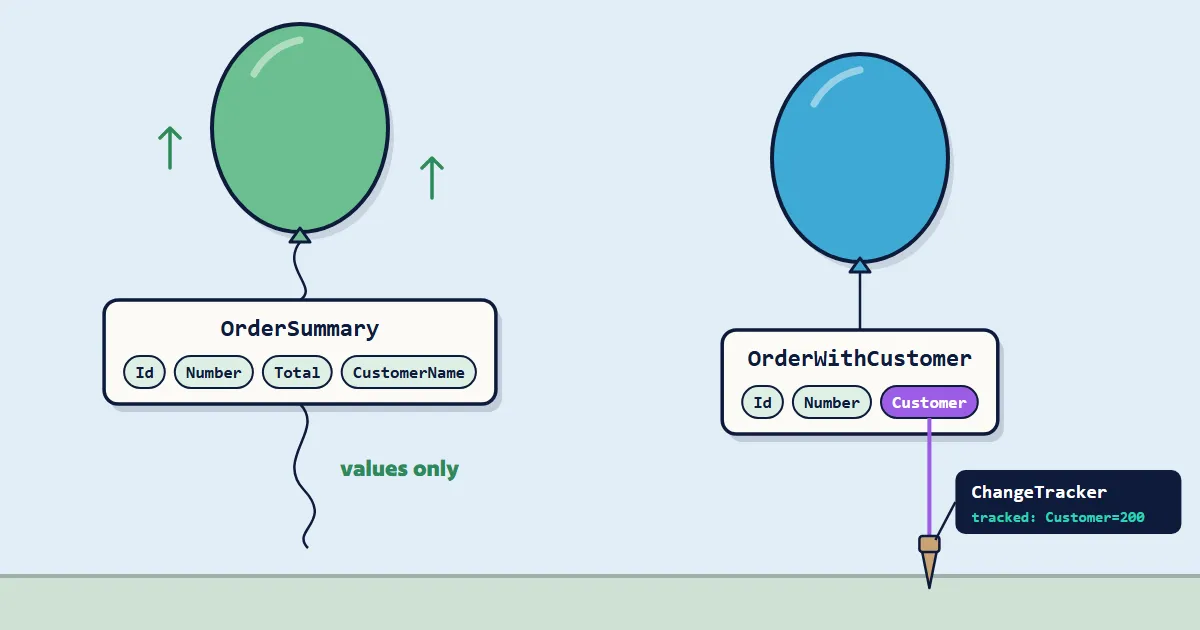
"Projections in Entity Framework allow you to select only the data you need, optimizing performance." That's how Pedro Constantino's EF Core tip on LinkedIn opens, and it adds one more claim: when you project with Select, "the query automatically bypasses EF Core's change tracker". I agree with the first part, and this article puts numbers on it. The second part holds for the typical case, but not always.
This article measures, in EF Core 10, the memory and time of a projection against the full entity, tracked and with AsNoTracking, and shows the two cases where a Select does track: when there's an entity in the result and when the entity is passed to a custom method. Along the way there's a result that runs against intuition: with heavily repeated entities, AsNoTracking costs more than tracking. Everything was measured with EF Core 10.0.14 on in-memory SQLite, .NET 10.0.14 and BenchmarkDotNet 0.15.8, on an AMD Ryzen 5 3600 running Windows 11.
What tracking costs
The EF Core tracking guide states the default plainly: "By default, queries that return entity types are tracking." Tracking has a cost, and the efficient querying guide explains it: "EF internally maintains a dictionary of tracked instances", and it also keeps a copy of each entity to detect changes: "The snapshot takes up more memory, and the snapshotting process itself takes time".
That's why, according to the tracking guide, no-tracking queries are "generally quicker to execute because there's no need to set up the change tracking information". In these runs, reading the 10,000 orders as entities with AsNoTracking took 46.30 ms and allocated 16.21 MB, against 69.39 ms and 22.65 MB with tracking: a ratio of 0.67 in time and 0.72 in memory. The guide publishes its own benchmark, with 10 blogs of 20 posts each, and gives AsNoTracking a ratio of 0.71. The two agree.
The model and the queries
The data is 200 customers with 50 orders each, 10,000 orders in total. Each order carries 400 characters of notes and a 200-character address, and each customer has 400 characters of notes. That way, fetching extra columns shows up in the numbers:
using Microsoft.EntityFrameworkCore;

namespace ProjectionLab;

public sealed class Customer
{
    public int Id { get; set; }
    public required string Name { get; set; }
    public required string Email { get; set; }
    public required string Notes { get; set; }
    public List<Order> Orders { get; } = [];
}

public sealed class Order
{
    public int Id { get; set; }
    public int CustomerId { get; set; }
    public Customer Customer { get; set; } = null!;
    public required string Number { get; set; }
    public decimal Total { get; set; }
    public required string ShippingAddress { get; set; }
    public required string Notes { get; set; }
    public DateTime CreatedAt { get; set; }
}

public sealed record OrderSummary(int Id, string Number, decimal Total, string CustomerName);

public sealed class ShopContext(DbContextOptions<ShopContext> options) : DbContext(options)
{
    public DbSet<Customer> Customers => Set<Customer>();
    public DbSet<Order> Orders => Set<Order>();
}
All nine queries read the 10,000 orders. Only the way they ask for them changes:
using Microsoft.EntityFrameworkCore;

namespace ProjectionLab;

// The queries compared in the post. Each one reads all 10,000 orders.
public static class Queries
{
    // 1. Full entities, tracked (the default).
    public static IQueryable<Order> Tracked(ShopContext context) =>
        context.Orders;

    // 2. Full entities, not tracked.
    public static IQueryable<Order> NoTracking(ShopContext context) =>
        context.Orders.AsNoTracking();

    // 3. Projection to a DTO: only scalar values, nothing to track.
    public static IQueryable<OrderSummary> ProjectionToDto(ShopContext context) =>
        context.Orders.Select(o => new OrderSummary(o.Id, o.Number, o.Total, o.Customer.Name));

    // 4. Projection that contains an entity: the Customer instances ARE tracked.
    public static IQueryable<OrderWithCustomer> ProjectionWithEntity(ShopContext context) =>
        context.Orders.Select(o => new OrderWithCustomer(o.Id, o.Number, o.Customer));

    // 5. Same as 4 with AsNoTracking: nothing is tracked.
    public static IQueryable<OrderWithCustomer> ProjectionWithEntityNoTracking(ShopContext context) =>
        context.Orders.AsNoTracking().Select(o => new OrderWithCustomer(o.Id, o.Number, o.Customer));

    // 6. Client-side method in the final projection that receives the entity: the Order IS tracked.
    public static IQueryable<OrderLabel> ProjectionWithClientMethod(ShopContext context) =>
        context.Orders.Select(o => new OrderLabel(o.Id, FormatLabel(o)));

    // 7. Include, tracked: identity resolution shares one Customer instance per customer.
    public static IQueryable<Order> IncludeTracked(ShopContext context) =>
        context.Orders.Include(o => o.Customer);

    // 8. Include, not tracked: one Customer instance per order row.
    public static IQueryable<Order> IncludeNoTracking(ShopContext context) =>
        context.Orders.AsNoTracking().Include(o => o.Customer);

    // 9. Same as 4/5 with AsNoTrackingWithIdentityResolution: nothing tracked, one instance per customer.
    public static IQueryable<OrderWithCustomer> ProjectionWithEntityIdentityResolution(ShopContext context) =>
        context.Orders.AsNoTrackingWithIdentityResolution().Select(o => new OrderWithCustomer(o.Id, o.Number, o.Customer));

    public static string FormatLabel(Order order) => $"{order.Number} ({order.Total:F2})";
}

public sealed record OrderWithCustomer(int Id, string Number, Customer Customer);

public sealed record OrderLabel(int Id, string Label);
With a DTO, Pedro is right
Query 3 projects to OrderSummary, a record with four values. The SQL fetches only those four columns and the context tracks nothing:
=== 3. Select to DTO (scalars only)
SQL: SELECT "o"."Id", "o"."Number", "o"."Total", "c"."Name" FROM "Orders" AS "o" INNER JOIN "Customers" AS "c" ON "o"."CustomerId" = "c"."Id"
rows=10000 tracked: none | Customer instances: -
That's what the guide says: "If the result set doesn't contain any entity types, then no tracking is done." The efficient querying guide describes the problem it solves: "Although this code only actually needs each Blog's Url property, the entire Blog entity is fetched, and unneeded columns are transferred from the database". And the fix is exactly this: "This can be optimized by using Select to tell EF which columns to project out".
The difference is large. In BenchmarkDotNet, the projection took 16.43 ms and allocated 3.92 MB, against 69.39 ms and 22.65 MB for tracked entities: 24% of the time and 17% of the memory. The projection tracks nothing and, on top of that, skips the notes and the address.
When Select does track (1): an entity inside the result
Query 4 is also a Select, to a record that isn't an entity. But one of its fields is o.Customer, and that changes everything:
=== 4. Select with an entity inside
SQL: SELECT "o"."Id", "o"."Number", "c"."Id", "c"."Email", "c"."Name", "c"."Notes" FROM "Orders" AS "o" INNER JOIN "Customers" AS "c" ON "o"."CustomerId" = "c"."Id"
rows=10000 tracked: Customer=200 | Customer instances: 200
The context tracks the 200 distinct customers. The guide warns about it: "Even if the result type of the query isn't an entity type, EF Core will still track entity types contained in the result by default." The result type doesn't decide; the entities inside it do.
The practical consequence is that whatever is tracked gets saved. The test program renames a customer that came out of that Select and calls SaveChanges:
=== 10. Editing a Customer that came out of a Select
State before SaveChanges: Modified
Rows written by SaveChanges: 1
Name in the database now: Renamed through a projection
A Select that looked read-only ends up writing if anyone calls SaveChanges on the same context, for example in a service that reads and then saves something else. And even if nobody saves, those entities stay in the context for as long as it lives: in a long-lived one, like a worker with a single DbContext, every read like this leaves its own behind.
Select returns an entity or a collection of entities, even inside an anonymous type or a record, those entities are tracked. Review the Select calls that put o.Customer, c.Orders or similar into the result.When Select does track (2): a custom method that receives the entity
Query 6 looks like the most innocent projection of all: an OrderLabel with two values. But the second one comes from FormatLabel(o), a C# method that receives the whole order. EF Core can't translate that method to SQL, so it fetches the full order and calls the method in memory:
=== 6. Select with a client method that receives the entity
SQL: SELECT "o"."Id", "o"."CreatedAt", "o"."CustomerId", "o"."Notes", "o"."Number", "o"."ShippingAddress", "o"."Total" FROM "Orders" AS "o"
rows=10000 tracked: Order=10000 | Customer instances: -
The SQL asks for every column, notes and address included, and the context tracks all 10,000 orders. The guide puts it this way: "If EF Core materializes an entity instance for client evaluation, it will be tracked." In BenchmarkDotNet this "projection" is slower and allocates more than simply reading the entities: 81.10 ms and 23.58 MB, with ratios of 1.17 and 1.04 against query 1.
The same happens with the two usual ways of mapping: a DTO constructor that receives the entity (new OrderDto(o)) and an extension method (o.ToDto()). To EF Core both are custom methods, and they come out like query 6:
=== 11. Select with a DTO constructor that receives the entity
SQL: SELECT "o"."Id", "o"."CreatedAt", "o"."CustomerId", "o"."Notes", "o"."Number", "o"."ShippingAddress", "o"."Total" FROM "Orders" AS "o"
rows=10000 tracked: Order=10000 | Customer instances: -

=== 12. Select with an extension method that receives the entity
SQL: SELECT "o"."Id", "o"."CreatedAt", "o"."CustomerId", "o"."Notes", "o"."Number", "o"."ShippingAddress", "o"."Total" FROM "Orders" AS "o"
rows=10000 tracked: Order=10000 | Customer instances: -
And the risk isn't only the cost. EF Core doesn't load the navigations for the method: in a clean context, if it reads order.Customer.Name, Customer is null and the query throws. With Include, or if the context already tracks those customers, it works. The same method can pass in one request and fail in another:
=== 13. A client method that reads a navigation
clean context: NullReferenceException: Object reference not set to an instance of an object.
with Include(o => o.Customer): rows=10000
customers already tracked: rows=10000
My rule: in the final Select, pass the method, the constructor or the extension the values it needs (o.Number, o.Total), never the whole entity.
AsNoTracking doesn't always cost less
Intuition says that not tracking always saves. With repeated entities, it doesn't. In query 4 every customer appears in 50 orders and carries 400 characters of notes. With fewer repetitions or smaller customers the gap should shrink, but I didn't measure that. The table compares three ways of reading the same thing:
| Query | Tracked | Customer instances | Retained (results + context) | BenchmarkDotNet |
|---|---|---|---|---|
4. Select with an entity | Customer=200 | 200 | 1,291 KB | 14.99 ms, 3.86 MB |
5. 4 + AsNoTracking | none | 10,000 | 11,080 KB | 41.17 ms, 12.81 MB |
9. 4 + AsNoTrackingWithIdentityResolution | none | 200 | 1,207 KB | 15.56 ms, 3.87 MB |
With tracking, EF Core hands the same Customer instance to the 50 orders of each customer: 200 instances. With AsNoTracking it creates one per row: 10,000 instances, about nine times the retained memory and nearly three times the time. The efficient querying guide explains it: "since no-tracking queries do not perform identity resolution, a database row which is referenced by multiple other loaded rows will be materialized as different instances." Its example is the same with other names: "A no-tracking query, in contrast, duplicates the same Blog 100 times".
Include behaves the same way: tracked, 18,226 KB retained; with AsNoTracking, 24,205 KB and 10,000 Customer instances. The identity resolution guide gives the design reason: "No-tracking queries do not perform identity resolution because doing so impacts the performance of streaming a large number of entities from a query."
To read without tracking and without duplicates, there's AsNoTrackingWithIdentityResolution: "you can have a no-tracking query, which does identity resolution in the results". Measured: nothing tracked and 200 instances, with the same allocated memory as the tracked version (3.87 MB against 3.86 MB).
The "retained" column is a single measurement with GC.GetTotalMemory(true), with the results and the context still alive; it's good for comparing orders of magnitude (1 MB against 11 MB), not as an exact figure. Query 4 comes out slightly faster than the DTO, but the two are within each other's noise, and BenchmarkDotNet warned that query 4's distribution may have several modes. What does hold is that they allocate the same, about 3.9 MB, and that query 4 leaves 200 tracked entities behind.
AsNoTracking creates one copy per row. Use AsNoTrackingWithIdentityResolution or project only the values. Here they cost about the same (3.87 MB against 3.92 MB); the projection tracks nothing and exposes no extra columns.All the measurements
BenchmarkDotNet 0.15.8 with MemoryDiagnoser, 3 warmup runs and 15 iterations. "Allocated" is the memory the query requests, not what stays alive at the end:
| Query | Mean | Ratio | Allocated | Alloc ratio |
|---|---|---|---|---|
| 1. Tracked entities | 69.39 ms | 1.00 | 22.65 MB | 1.00 |
2. Entities with AsNoTracking | 46.30 ms | 0.67 | 16.21 MB | 0.72 |
3. Select to a DTO | 16.43 ms | 0.24 | 3.92 MB | 0.17 |
4. Select with an entity | 14.99 ms | 0.22 | 3.86 MB | 0.17 |
5. 4 + AsNoTracking | 41.17 ms | 0.59 | 12.81 MB | 0.57 |
9. 4 + AsNoTrackingWithIdentityResolution | 15.56 ms | 0.22 | 3.87 MB | 0.17 |
6. Select with a custom method | 81.10 ms | 1.17 | 23.58 MB | 1.04 |
7. Tracked Include | 113.49 ms | 1.64 | 26.37 MB | 1.16 |
8. Include + AsNoTracking | 122.18 ms | 1.76 | 31.01 MB | 1.37 |
This is in-memory SQLite on one specific machine. With a real database server the network comes into play, and fetching fewer columns matters even more; the time ratios will change, so don't take them as figures for your provider.
Trust the memory and the broad ratios more than the exact milliseconds: in a second run on the same machine, the times moved around.
How to see it in your own code
Two tools are enough to know what a query does: ToQueryString() gives you the SQL without running it, and context.ChangeTracker.Entries() tells you what ended up tracked. The test program uses both in its Show method, and it seeds the same data as the measurements. It's a console app with a single package (dotnet add package Microsoft.EntityFrameworkCore.Sqlite --version 10.0.14). Every output in the post comes from it; cases 11 to 16 exist only here, not in the measurements:
using Microsoft.Data.Sqlite;
using Microsoft.EntityFrameworkCore;
using ProjectionLab;

// In-memory SQLite with the same data as the measurements: 200 customers x 50 orders.
using var connection = new SqliteConnection("Data Source=:memory:");
connection.Open();
var options = new DbContextOptionsBuilder<ShopContext>().UseSqlite(connection).Options;
using (var seed = new ShopContext(options))
{
    seed.Database.EnsureCreated();
    for (var c = 1; c <= 200; c++)
    {
        var customer = new Customer { Name = $"Customer {c}", Email = $"customer{c}@example.com", Notes = new string('n', 400) };
        for (var o = 1; o <= 50; o++)
        {
            customer.Orders.Add(new Order
            {
                Number = $"ORD-{c:D3}-{o:D3}",
                Total = c + o / 100m,
                ShippingAddress = new string('a', 200),
                Notes = new string('n', 400),
                CreatedAt = new DateTime(2026, 1, 1).AddMinutes(c * 100 + o),
            });
        }
        seed.Customers.Add(customer);
    }
    seed.SaveChanges();
}

Show("3. Select to DTO (scalars only)", Queries.ProjectionToDto);
Show("4. Select with an entity inside", Queries.ProjectionWithEntity);
Show("5. Select with an entity inside + AsNoTracking", Queries.ProjectionWithEntityNoTracking);
Show("6. Select with a client method that receives the entity", Queries.ProjectionWithClientMethod);
Show("9. Select with an entity inside + AsNoTrackingWithIdentityResolution", Queries.ProjectionWithEntityIdentityResolution);

// An entity that came out of a Select is tracked, so SaveChanges writes it.
Console.WriteLine("\n=== 10. Editing a Customer that came out of a Select");
int renamedId;
using (var context = new ShopContext(options))
{
    var first = Queries.ProjectionWithEntity(context).First();
    renamedId = first.Customer.Id;
    first.Customer.Name = "Renamed through a projection";
    Console.WriteLine($"State before SaveChanges: {context.Entry(first.Customer).State}");
    Console.WriteLine($"Rows written by SaveChanges: {context.SaveChanges()}");
}
using (var context = new ShopContext(options))
{
    Console.WriteLine($"Name in the database now: {context.Customers.AsNoTracking().Single(c => c.Id == renamedId).Name}");
}

// A DTO constructor or an extension method that receives the entity is the same case as 6.
Show("11. Select with a DTO constructor that receives the entity", c => c.Orders.Select(o => new OrderDto(o)));
Show("12. Select with an extension method that receives the entity", c => c.Orders.Select(o => o.ToDto()));

// The client method gets the entity without its navigations: in a clean context, order.Customer is null.
// With Include, or with the customers already tracked by the context, it is filled in.
Console.WriteLine("\n=== 13. A client method that reads a navigation");
Label("clean context", c => c.Orders);
Label("with Include(o => o.Customer)", c => c.Orders.Include(o => o.Customer));
Label("customers already tracked", c => { c.Customers.Load(); return c.Orders; });

// With NoTracking as the context default, query 4 tracks nothing.
var noTrackingOptions = new DbContextOptionsBuilder<ShopContext>()
    .UseSqlite(connection)
    .UseQueryTrackingBehavior(QueryTrackingBehavior.NoTracking)
    .Options;
Show("14. Query 4 with UseQueryTrackingBehavior(NoTracking)", Queries.ProjectionWithEntity, noTrackingOptions);

// AsTracking() on one query brings tracking back, and with it the SaveChanges case.
Show("15. Query 4 with the NoTracking default and AsTracking()", c => Queries.ProjectionWithEntity(c).AsTracking(), noTrackingOptions);

// NoTrackingWithIdentityResolution as the default: nothing tracked, one instance per customer.
var identityOptions = new DbContextOptionsBuilder<ShopContext>()
    .UseSqlite(connection)
    .UseQueryTrackingBehavior(QueryTrackingBehavior.NoTrackingWithIdentityResolution)
    .Options;
Show("16. Query 4 with UseQueryTrackingBehavior(NoTrackingWithIdentityResolution)", Queries.ProjectionWithEntity, identityOptions);

// Runs query 13 in a new context: the number of labels, or the exception it throws.
void Label(string label, Func<ShopContext, IQueryable<Order>> source)
{
    using var context = new ShopContext(options);
    try
    {
        Console.WriteLine($"{label}: rows={source(context).Select(o => OrderMappings.LabelWithCustomer(o)).ToList().Count}");
    }
    catch (NullReferenceException ex)
    {
        Console.WriteLine($"{label}: {ex.GetType().Name}: {ex.Message}");
    }
}

// Prints the SQL, what the context tracks and how many Customer instances the results hold.
void Show<T>(string title, Func<ShopContext, IQueryable<T>> query, DbContextOptions<ShopContext>? contextOptions = null)
{
    using var context = new ShopContext(contextOptions ?? options);
    var rows = query(context).ToList();
    var tracked = context.ChangeTracker.Entries()
        .GroupBy(e => e.Entity.GetType().Name)
        .Select(g => $"{g.Key}={g.Count()}")
        .DefaultIfEmpty("none");
    var customers = rows.OfType<OrderWithCustomer>().Select(r => r.Customer).ToList();
    var instances = customers.Count == 0 ? "-" : customers.Distinct(ReferenceEqualityComparer.Instance).Count().ToString();
    Console.WriteLine($"\n=== {title}");
    Console.WriteLine($"SQL: {query(context).ToQueryString().ReplaceLineEndings(" ")}");
    Console.WriteLine($"rows={rows.Count} tracked: {string.Join(", ", tracked)} | Customer instances: {instances}");
}

public sealed record OrderDto(int Id, string Number, decimal Total)
{
    // Mapping constructor: it receives the whole entity.
    public OrderDto(Order order) : this(order.Id, order.Number, order.Total) { }
}

public static class OrderMappings
{
    // Mapping extension method: it also receives the whole entity.
    public static OrderDto ToDto(this Order order) => new(order.Id, order.Number, order.Total);

    // Reads a navigation: inside a final Select, EF Core only loads it for this method with Include.
    // Without Include, order.Customer is null unless the context already tracks that customer.
    public static string LabelWithCustomer(Order order) => $"{order.Number} for {order.Customer.Name}";
}
The other two variants with the entity inside the Select give this:
=== 5. Select with an entity inside + AsNoTracking
SQL: SELECT "o"."Id", "o"."Number", "c"."Id", "c"."Email", "c"."Name", "c"."Notes" FROM "Orders" AS "o" INNER JOIN "Customers" AS "c" ON "o"."CustomerId" = "c"."Id"
rows=10000 tracked: none | Customer instances: 10000

=== 9. Select with an entity inside + AsNoTrackingWithIdentityResolution
SQL: SELECT "o"."Id", "o"."Number", "c"."Id", "c"."Email", "c"."Name", "c"."Notes" FROM "Orders" AS "o" INNER JOIN "Customers" AS "c" ON "o"."CustomerId" = "c"."Id"
rows=10000 tracked: none | Customer instances: 200
If a query you think of as read-only returns anything from ChangeTracker.Entries(), or its SQL fetches columns you don't use, you're looking at one of the two cases above.
A caveat if your context doesn't track by default: with UseQueryTrackingBehavior(QueryTrackingBehavior.NoTracking), query 4 tracks nothing, but it doesn't resolve identity either, just like AsNoTracking. A team with that option won't see the SaveChanges case unless it uses AsTracking():
=== 14. Query 4 with UseQueryTrackingBehavior(NoTracking)
SQL: SELECT "o"."Id", "o"."Number", "c"."Id", "c"."Email", "c"."Name", "c"."Notes" FROM "Orders" AS "o" INNER JOIN "Customers" AS "c" ON "o"."CustomerId" = "c"."Id"
rows=10000 tracked: none | Customer instances: 10000

=== 15. Query 4 with the NoTracking default and AsTracking()
SQL: SELECT "o"."Id", "o"."Number", "c"."Id", "c"."Email", "c"."Name", "c"."Notes" FROM "Orders" AS "o" INNER JOIN "Customers" AS "c" ON "o"."CustomerId" = "c"."Id"
rows=10000 tracked: Customer=200 | Customer instances: 200
With NoTrackingWithIdentityResolution as the default, it tracks nothing and gives one instance per customer, like query 9:
=== 16. Query 4 with UseQueryTrackingBehavior(NoTrackingWithIdentityResolution)
SQL: SELECT "o"."Id", "o"."Number", "c"."Id", "c"."Email", "c"."Name", "c"."Notes" FROM "Orders" AS "o" INNER JOIN "Customers" AS "c" ON "o"."CustomerId" = "c"."Id"
rows=10000 tracked: none | Customer instances: 200ChangeTracker.Entries() stays empty. If it doesn't, someone put an entity inside a Select.The practical rule
- To read and respond,
Selectto a DTO with values only. If you need to change something afterwards, load the entity: the guide warns that "EF's change tracking only works with entity instances". - If you need the entity in the result and won't save it:
AsNoTrackingWithIdentityResolutionif entities repeat,AsNoTrackingif they don't. - Never pass the whole entity to a method, a DTO constructor or an extension method in the final
Select. - Pedro's point about security, "limit exposure by returning only necessary fields", holds with a DTO. An entity tucked inside an anonymous type still carries all its columns, including the ones you didn't mean to expose.
What isn't tested
- Only in-memory SQLite. I didn't measure SQL Server, PostgreSQL or a database over the network, and I give no numbers for other providers.
- I didn't test what an API returns when it serializes
OrderWithCustomer: the entity goes out whole, but I didn't measure the shape or the cycles. - I didn't profile why the tracked query 4 and query 9 cost about the same as the DTO. It fits identity resolution (200 instances instead of 10,000), but I didn't measure where each millisecond goes.
- The behavior isn't new in EF Core 10: these tracking rules have been in the guide since EF Core 3.0. What's new is the measurement, on the current long-term support release: "EF10 will be supported until November 10, 2028".
Frequently asked questions
Does a Select to an anonymous type track?
It depends on what's inside. If it only carries values, no. If it carries an entity, like new { o.Id, o.Customer }, that entity is tracked just like in query 4.
Should I add AsNoTracking to every read query?
For entities that don't repeat, it usually saves: here, 33% of the time. If the result repeats entities, it can cost more than tracking; there, AsNoTrackingWithIdentityResolution or a projection to values is the better choice.
How do I know whether a query fetches extra columns?
Call ToQueryString() and look at the SELECT. If columns show up that the result doesn't use, like the notes in query 6, something in the Select is asking for the whole entity.
Conclusion
Projecting is the best way to read with EF Core: with a DTO of values, the query took a quarter of the time and allocated a sixth of the memory of tracked entities. But "Select bypasses the change tracker" only holds when the result carries values. An entity inside the result gets tracked and can be saved by accident, and a custom method, constructor or extension that receives the entity forces every column to be fetched and every row to be tracked, and, without Include, the entity reaches it without navigations unless the context already has them. And with heavily repeated entities, AsNoTracking costs more than tracking.
If you use projections on the read side, as in the query handlers of the CQRS in .NET 10 post, check with ToQueryString() and ChangeTracker.Entries() that none of them puts an entity in the result.
References
- Tracking vs. No-Tracking Queries — Microsoft Learn: learn.microsoft.com/en-us/ef/core/querying/tracking
- Efficient Querying — Microsoft Learn: learn.microsoft.com/en-us/ef/core/performance/efficient-querying
- Identity Resolution in EF Core — Microsoft Learn: learn.microsoft.com/en-us/ef/core/change-tracking/identity-resolution
- What's New in EF Core 10 — Microsoft Learn: learn.microsoft.com/en-us/ef/core/what-is-new/ef-core-10.0/whatsnew
Tags
Share this post
Subscribe
Get the latest posts delivered right to your inbox.



Leave a comment