.NET Development
REST vs GraphQL in .NET 10: who decides the shape of the response
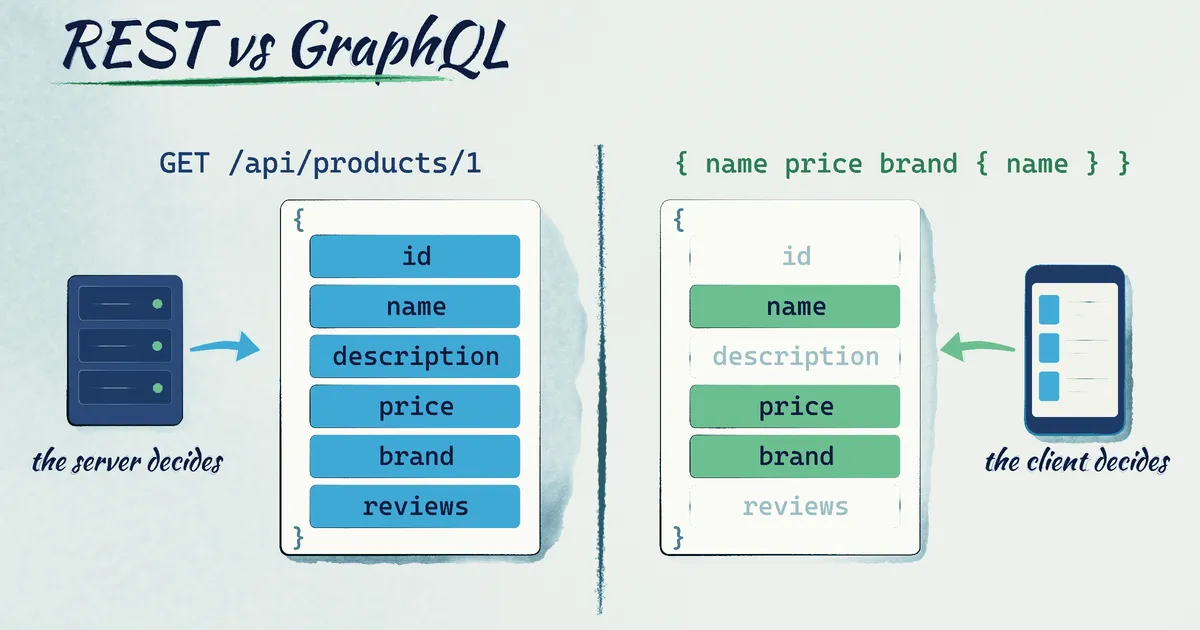
Choosing between REST and GraphQL means choosing who decides the shape of the response: the server, with one URL per resource, or the client, with a query that names the fields it wants. With the same store served both ways in .NET 10, it becomes clear where GraphQL saves requests, where it saves nothing and which limits it needs before it faces the public. The numbers come from a public repository that counts HTTP requests, bytes and SQL queries per screen, without measuring time or load.
What each one is
A REST API exposes resources. Every product, brand and review has its own URL, such as /api/products/1 or /api/brands/3, and the server returns a representation it designed, with the fields it chose. The style comes from chapter 5 of Roy Fielding's dissertation, which defines it with four interface constraints: identification of resources, manipulation of resources through representations, self-descriptive messages, and hypermedia as the engine of application state. The same dissertation requires every response to be labeled as cacheable or non-cacheable, and that is where the most concrete advantage of REST comes from.
GraphQL is, in the words of its specification, a query language and execution engine for describing and performing the capabilities and requirements of data models for client-server applications. The server publishes a schema with types, such as Product or Brand, and their fields. The client sends a query with the fields it needs to a single endpoint, /graphql, and gets those fields and nothing else. GraphQL was created in 2012 and work on its open standard started in 2015; today it is hosted by the GraphQL Foundation, part of the Linux Foundation.
In REST, the server decides which fields each URL returns; in GraphQL, the client picks them in every query. The strengths and the traps of each one follow from that difference.
What each one is good for
REST fits a public API and HTTP caching. Under RFC 9110, the response to a GET request is cacheable, so a browser, a proxy or a CDN can store it and use the URL as the key. The GraphQL documentation on caching says as much: in an endpoint-based API, the URL is a globally unique identifier the client can build a cache on, and GraphQL has no equivalent primitive.
GraphQL fits when several screens need different fields from the same data. A mobile list wants name, price and brand; a web detail page wants the description, the brand's country and the reviews. With REST, the server either picks one representation for all of them or adds an endpoint per screen. With GraphQL, each screen writes its own query and the server stays the same.
REST wins when a response can be stored by URL; GraphQL wins when each client needs a different shape of the same data. If the choice is between REST and gRPC, with a .proto contract and streaming, the comparison is in gRPC in .NET 10 vs REST.
An example: one store, two screens
The repository serves a small catalog, with 10 brands, 50 products and 40 reviews, from a single ASP.NET Core application: a REST API built with minimal APIs and a GraphQL API built with Hot Chocolate, both on the same in-memory SQLite database through EF Core. Two screens use it:
- The mobile list: name, price and brand of 10 products.
- The web detail page of one product: description, price, brand with its country, and reviews.
For the list, the REST client requests /api/products?pageSize=10. Each product carries brandId rather than the brand name, so the client requests /api/brands/{id} once for every distinct brand. The GraphQL client sends one query:
{ products(first: 10) { name price brand { name } } }| Screen | API | HTTP requests | Response bytes | SQL queries |
|---|---|---|---|---|
| List of 10 products | REST | 11 | 1,880 | 11 |
| List of 10 products | GraphQL | 1 | 663 | 2 |
| Detail of product 1 | REST | 1 | 296 | 2 |
| Detail of product 1 | GraphQL | 1 | 293 | 3 |
The list is the worst case for REST: the 10 products belong to 10 different brands, so each one costs an extra request. On the detail page, REST already has an endpoint shaped like the screen: 296 bytes against 293, with one more SQL query on the GraphQL side, which resolves product, brand and reviews separately. Byte counts cover the response body only, without headers or compression.
GraphQL saves when the screen does not match the server's resources; when it matches, both cost the same.
The code side by side
In REST, each endpoint builds its whole response; in GraphQL, each field has its own function and the engine assembles the response from the ones the query asks for.
REST: one URL per resource
The routes and the list endpoint (src/Store.Api/Rest/RestEndpoints.cs):
public static IEndpointRouteBuilder MapRestApi(this IEndpointRouteBuilder app)
{
    var api = app.MapGroup("/api");

    api.MapGet("/products", GetProductsAsync);
    api.MapGet("/products/{id:int}", GetProductAsync);
    api.MapGet("/brands/{id:int}", GetBrandAsync);
    api.MapPost("/products/{id:int}/reviews", AddReviewAsync);

    return app;
}

private static async Task<IResult> GetProductsAsync(
    IDbContextFactory<StoreDbContext> dbFactory, HttpContext http, CancellationToken ct,
    int page = 1, int pageSize = Limits.DefaultPageSize)
{
    // Report only the parameters that are out of range.
    var errors = new Dictionary<string, string[]>();
    if (page is < 1 or > Limits.MaxPage)
    {
        errors["page"] = [$"page must be between 1 and {Limits.MaxPage}."];
    }

    if (pageSize is < 1 or > Limits.MaxPageSize)
    {
        errors["pageSize"] = [$"pageSize must be between 1 and {Limits.MaxPageSize}."];
    }

    if (errors.Count > 0)
    {
        return Results.ValidationProblem(errors);
    }

    await using var db = await dbFactory.CreateDbContextAsync(ct);
    var items = await db.Products.AsNoTracking()
        .OrderBy(p => p.Id)
        .Skip((page - 1) * pageSize)
        .Take(pageSize)
        .Select(p => new ProductResource(p.Id, p.Name, p.Description, p.Price, p.BrandId))
        .ToListAsync(ct);

    // Catalog data: without Authorization, any HTTP cache (browser, proxy, CDN) may reuse it for 60 s.
    // With Authorization the response may be user-specific, and "public" would let a shared cache
    // keep it (RFC 9111, section 3.5), so it is "private": only the browser may reuse it.
    http.Response.Headers.CacheControl = http.Request.Headers.Authorization.Count == 0
        ? "public, max-age=60"
        : "private, max-age=60";
    return Results.Ok(items);
}
A page or pageSize out of range gets a 400 with a Problem Details body that names only the bad parameter, the RFC 9457 format covered in Problem Details in ASP.NET Core 10. The cap of 10,000 pages rejects page=2147483647 before (page - 1) * pageSize is computed, which would overflow with that value.
GraphQL: one endpoint and a schema
The query root (src/Store.Api/GraphQL/Query.cs). Hot Chocolate builds the schema from this class, and the GetProductsAsync method is published as the products field:
using HotChocolate;
using HotChocolate.CostAnalysis.Types;
using HotChocolate.Types;
using Microsoft.EntityFrameworkCore;
using Store.Api.Data;

namespace Store.Api.GraphQL;

// GraphQL: one endpoint, and the client decides which fields come back.
[QueryType]
public static partial class Query
{
    // ListSize tells cost analysis that this list holds up to "first" items (at most 50).
    [ListSize(
        AssumedSize = Limits.MaxPageSize,
        SlicingArguments = ["first"],
        RequireOneSlicingArgument = false,
        SlicingArgumentDefaultValue = Limits.DefaultPageSize)]
    public static async Task<IReadOnlyList<Product>> GetProductsAsync(
        IDbContextFactory<StoreDbContext> dbFactory, CancellationToken ct, int first = Limits.DefaultPageSize)
    {
        if (first is < 1 or > Limits.MaxPageSize)
        {
            throw new GraphQLException(ErrorBuilder.New()
                .SetMessage($"first must be between 1 and {Limits.MaxPageSize}.")
                .SetCode("STORE_INVALID_FIRST")
                .Build());
        }

        await using var db = await dbFactory.CreateDbContextAsync(ct);
        return await db.Products.AsNoTracking()
            .OrderBy(p => p.Id)
            .Take(first)
            .ToListAsync(ct);
    }

    public static async Task<Product?> GetProductByIdAsync(
        int id, IProductByIdDataLoader productById, CancellationToken ct)
        => await productById.LoadAsync(id, ct);
}
ListSize limits nothing by itself: it tells cost analysis how many items the list can hold, and the actual limit comes from the check on first. Both APIs reject the same out-of-range values because they share Limits.cs: a page of 1 to 50 products and a rating from 1 to 5. One difference does not come from the repository. Minimal APIs read the JSON body with the System.Text.Json web defaults, which accept numbers written as strings, so {"rating":"5"} gets through REST, while GraphQL rejects the string "5" for an Int argument.
tools/Probe probe, which repeats every measurement in this post against the server running locally.The GraphQL trap: the N+1 problem
The function behind each field is called a resolver. The brand resolver takes a product and returns its brand. If that resolver goes to the database on its own, a list of N products costs one query for the list and N for the brands: N + 1. The GraphQL performance guide warns that a naive service can become very "chatty" and load data from the database over and over.
The repository has both resolvers, on purpose (src/Store.Api/GraphQL/ProductNode.cs):
using HotChocolate;
using HotChocolate.CostAnalysis.Types;
using HotChocolate.Types;
using Microsoft.EntityFrameworkCore;
using Store.Api.Data;

namespace Store.Api.GraphQL;

[ObjectType<Product>]
public static partial class ProductNode
{
    // Batched: the brands of every product in the response arrive in one SQL command.
    public static async Task<Brand> GetBrandAsync(
        [Parent] Product product, IBrandByIdDataLoader brandById, CancellationToken ct)
        => await brandById.LoadAsync(product.BrandId, ct)
           ?? throw new GraphQLException($"Brand {product.BrandId} not found.");

    // Naive on purpose, to show the N+1 problem: one SQL command per product in the list.
    public static async Task<Brand> GetBrandNaiveAsync(
        [Parent] Product product, IDbContextFactory<StoreDbContext> dbFactory, CancellationToken ct)
    {
        await using var db = await dbFactory.CreateDbContextAsync(ct);
        return await db.Brands.AsNoTracking().SingleAsync(b => b.Id == product.BrandId, ct);
    }

    // Reviews are not paged: cost analysis assumes up to 20 per product.
    [ListSize(AssumedSize = 20)]
    public static async Task<Review[]> GetReviewsAsync(
        [Parent] Product product, IReviewsByProductIdDataLoader reviewsByProductId, CancellationToken ct)
        => await reviewsByProductId.LoadAsync(product.Id, ct) ?? [];
}
The brand DataLoader is a method that receives every requested key and runs a single query (src/Store.Api/GraphQL/DataLoaders.cs, the first of the four in that file). Hot Chocolate generates the IBrandByIdDataLoader interface from it:
// Source-generated DataLoaders. Each method receives every key requested before the batch is
// dispatched (when no other resolver work is ready), deduplicated, and sends one SQL command for all of them.
internal static class DataLoaders
{
    [DataLoader]
    public static async Task<Dictionary<int, Brand>> GetBrandByIdAsync(
        IReadOnlyList<int> ids, IDbContextFactory<StoreDbContext> dbFactory, CancellationToken ct)
    {
        await using var db = await dbFactory.CreateDbContextAsync(ct);
        return await db.Brands.AsNoTracking()
            .Where(b => ids.Contains(b.Id))
            .ToDictionaryAsync(b => b.Id, ct);
    }
SQL queries per request, with the same query and each resolver:
| Products in the list | With brandNaive | With brand and a DataLoader |
|---|---|---|
| 1 | 2 | 2 |
| 10 | 11 | 2 |
| 50 | 51 | 2 |
With the DataLoader there are 2 queries, not one: the list and all the brands together. The Hot Chocolate documentation explains that a DataLoader batches lookups by key and collapses duplicate keys, so two products of the same brand ask for that brand only once. A DataLoader gathers the brand queries into one for the whole list.
N+1 is not unique to GraphQL. The EF Core guide on efficient querying describes it with lazy loading and warns that it can cause very significant performance issues. In this repository, the REST side does not have it on the server, because each endpoint runs its own query, but the client pays for it in HTTP requests: the 11 of the list.
Caching: simple by URL, hard by query
The REST GET responses in the repository carry Cache-Control: public, max-age=60 for products and max-age=300 for brands when the request has no Authorization header. Any HTTP cache between client and server can reuse them without changes to the client code. With Authorization they carry private, which lets only the browser keep them: under RFC 9111, public would let a shared cache store the response to a request with Authorization and reuse it for another client.
In GraphQL, POST is the mandatory transport: GraphQL over HTTP requires servers to accept POST with a JSON body, and GET for queries is optional. RFC 9110 says that responses to POST are only cacheable when they include explicit freshness information and a Content-Location header with the same value as the POST's target URI. In the repository, neither GraphQL responses over POST nor those over GET carry Cache-Control.
That does not mean GraphQL cannot be cached. Its performance guide says it is as cacheable as any API that enables parameterized requests. The Hot Chocolate Cache Control guide describes how: a deterministic GET route, or a request with the HTTP QUERY method, so caches get a stable key, plus the @cacheControl directive in the schema. The repository configures none of this. On the client, caching relies on a unique identifier per object, which takes the place of the URL.
In REST, HTTP caching takes one header on each GET; in GraphQL it has to be designed.
Who guards a public GraphQL API
A REST endpoint does an amount of work bounded by its code. A GraphQL endpoint runs whatever query the client writes, and the Hot Chocolate security guide warns that public APIs face unpredictable clients. The repository's schema has a cycle, since a brand lists its products and each product has its brand, so a query can nest without end. The limits the repository sets (src/Store.Api/Program.cs):
builder.AddGraphQL()
    .AddApiTypes()
    // brand -> products -> brand -> ... can nest without end; stop at 6 levels.
    .AddMaxExecutionDepthRule(6)
    // The schema stays readable at /graphql/schema.graphql; this only turns off __schema and __type queries.
.DisableIntrospection(!builder.Environment.IsDevelopment());- Maximum depth of 6 levels: a query 8 levels deep gets a 400 before it runs, even when the levels hide inside a fragment. The OWASP GraphQL Cheat Sheet calls for depth limiting.
- Cost analysis: Hot Chocolate computes the cost of each operation before running it and rejects it with
HC0047when it goes over 1,000 in field cost or 10,000 in type cost, its defaults. Thirty aliases ofproducts(first: 50)with the naive resolver are rejected on cost. - Introspection off outside Development: a
__schemaquery getsHC0046. The method that compiles with Hot Chocolate 16.7.7 isDisableIntrospection; the published documentation usesAllowIntrospection(false), which does not exist in that package and fails with error CS1061. Turning it off does not hide the schema, which is still served at/graphql/schema.graphql, and the introspection page states that disabling it is not about hiding the schema. The Nitro IDE is served only in Development (Tool.Enablein theMapGraphQLoptions). - Mutations over POST only: a mutation over GET gets a 405 with
Allow: POST, as GraphQL over HTTP recommends. Hot Chocolate does this without any code in the repository. - Parser cap: a document with 3,000 fields is cut off past 2,048, with
HC0011.
A GraphQL API open to the public needs depth and cost limits that REST does not, because the client decides how much work it orders.
HC0047, and 40 pass. The real queries of each screen should be tested against the limit before going live.The status code does not always tell whether there was an error either. With the default transport of Hot Chocolate 16.7.7, a query that asks for a missing field gets 400 with Accept: application/graphql-response+json and 200 with Accept: application/json; in the September 2026 edition mode, it gets 422 with both (in 16.7.7, HttpTransportVersion.Draft20260903; the documentation calls it September2026). With the default transport, an error thrown by a resolver, such as first: 1000, comes back with a 200 and "data": null under either header. A monitor that only looks at the HTTP status misses those errors.
What the repository does not cover
The repository shows the design difference between the two APIs; it is not a production-ready service. It lacks:
- Authentication and authorization: every field and the
addReviewmutation are open. TheCache-Controlrule only looks at theAuthorizationheader: with cookie authentication, a user-specific response would go out aspublic, so the rule has to check whether the request is authenticated. - Rate limiting: cost analysis bounds one request, not how many requests a client sends.
- Batched mutations:
addReviewweighs 100 in cost analysis, so one operation takes up to 10 aliases; with 11 it is rejected whole (HC0047). A request rate limit counts those 10 writes as one request. - Defense against batching attacks, which OWASP describes as a GraphQL-specific form of brute force: a batch sent as a JSON array gets a 400, but several aliases inside one query are stopped only by cost, and aliases of cheap fields were not tested.
- Review paging: cost analysis assumes 20 reviews per product, and a product with more still returns them all.
- Comment encoding: a review accepts any text, HTML and control characters included, and whoever shows it on a page has to encode it.
The numbers come from .NET 10 (ASP.NET Core 10.0.12), Hot Chocolate 16.7.7 and EF Core 10 with in-memory SQLite, with the server and the probe on the same machine. The probe counts SQL commands through a demo header that exists only in Development.
When REST and when GraphQL
| Need | Best fit | Why |
|---|---|---|
| Public API cached on a CDN | REST | Each GET is stored by its URL |
| Several screens asking for different fields | GraphQL | One query per screen: 1 request instead of 11 for the list |
| A screen shaped like one resource | Either | The detail page cost the same: 296 and 293 bytes |
| Clients outside the team's control | REST, or GraphQL with cost and depth limits | The client decides how much work it orders |
| Related data, such as the list with its brand | Either; GraphQL requires a DataLoader | Without one, 51 queries for 50 products |
The decision comes from who consumes the API.
Conclusion
REST and GraphQL split the same work differently. In REST, the server fixes the shape of each response and HTTP caching works by URL. In GraphQL, the client asks for the fields and the server has to defend itself against N+1, rebuild caching by hand and stop expensive queries.
References
- GraphQL, September 2026 Edition (spec.graphql.org)
- Fielding, Chapter 5: Representational State Transfer (REST) (ics.uci.edu)
- RFC 9110: HTTP Semantics (rfc-editor.org)
- GraphQL: Performance (graphql.org)
- Hot Chocolate: DataLoader (chillicream.com)
- Hot Chocolate: Cost Analysis (chillicream.com)
- OWASP GraphQL Cheat Sheet (cheatsheetseries.owasp.org)
- EF Core: Efficient Querying (learn.microsoft.com)
Tags
Share this post
Subscribe
Get the latest posts delivered right to your inbox.



Leave a comment