Software Architecture
The circuit breaker pattern: what it is, its states and how to use it in .NET
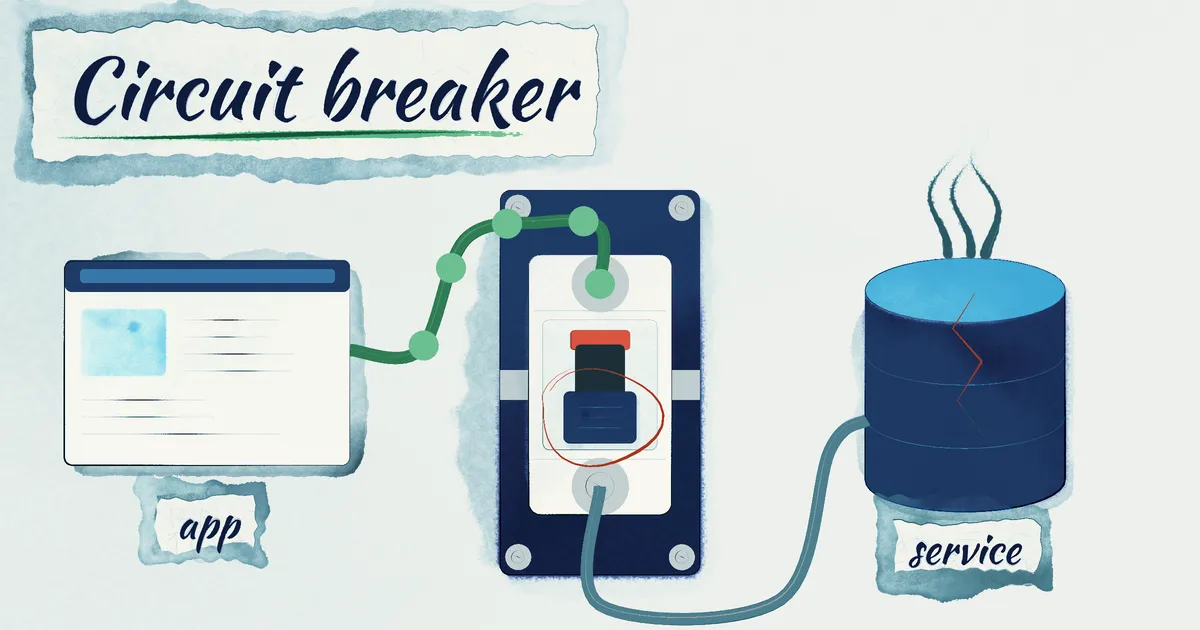
A circuit breaker is a piece of software that sits between an application and a service it depends on, such as a database, a cache or an external API. It counts the failed calls to that service and, when there are too many, stops calling it for a while: each call fails at once, without waiting for an answer, and the application responds with something else. After that while, it lets test calls through to see whether the service is back.
The name comes from the circuit breaker in a house's electrical panel. On a short circuit or an overload, that breaker cuts the power to its circuit so the wire does not burn, and the rest of the house keeps its lights on. The software version cuts the calls to the failing dependency so the application does not sit waiting, and the rest of the application keeps responding.
What it is for
A service can fail in two ways. If it is down, the connection is refused and the client knows at once. If it hangs, it accepts the call and never answers, and the client waits until its timeout runs out. The second case is the one that hurts. The pattern's description in the Azure Architecture Center explains why: requests blocked while they wait can hold critical system resources, such as memory, threads and database connections. If the wait blocks a thread, enough load leads to thread pool starvation in ASP.NET Core, measured in another post on this blog.
With the circuit breaker open, the call is never made. That has three effects:
- The application responds quickly even though the service does not answer, because it goes straight to its fallback.
- The resources the hanging requests used to hold are released.
- The failing service stops receiving calls from that application while the breaker stays open.
Where it comes from
According to Martin Fowler's article on the pattern, from 2014, Michael Nygard popularized it in his book Release It! to prevent cascading failures. When many callers depend on a supplier that does not respond, they can run out of critical resources, and the failure spreads to several systems. The idea, in Fowler's words, is to wrap the protected call in a circuit breaker object that monitors for failures. Once the failures reach a threshold, the breaker trips and every further call returns with an error, without the protected call being made at all.
Fowler also points out the difference from the breaker in a house: resetting it by hand is reasonable in a building, but in software the breaker should try the call again after a suitable interval and reset itself if it succeeds. That is where the third state comes from.
The three states
- Closed: normal operation. Calls go through to the service and the breaker counts how many fail. If the failures exceed the configured limit, it opens.
- Open: the call fails at once with an exception, without touching the service. In Polly, a resilience library for .NET, that exception is
BrokenCircuitException. It stays open for a fixed time, which Polly callsBreakDurationand which defaults to 5 s. - Half-open: once that time is up, it lets test calls through (one, in Polly: the rest keep failing at once until it ends). If the test succeeds, it closes; if it fails, it opens again and waits another
BreakDuration.
What it needs next to it: a timeout and a fallback
The breaker only decides whether the service gets called. Two more pieces make it useful:
- A timeout per call. The breaker learns about a failure when the call ends. If the service hangs and the timeout is long, each failure takes a long time to arrive and the breaker is slow to open. The pattern warns about it: a circuit breaker might not fully protect an application from failures in external services that have long timeouts.
- A fallback. It is what the application returns when the breaker is open or the call fails. The pattern proposes degrading functionality or running another operation that gets the same data; with the breaker open, it can also return a default value that makes sense to the application. With a cache, the usual fallback is to read the database. Without one, an open breaker only turns every request into a fast error.
An everyday example
An online store shows a page for each product. To avoid querying the database on every visit, it keeps the product pages in a cache. One day the cache hangs: the process is still alive and accepts connections, but never replies.
- Without protection, each visit waits out the cache client's timeout, usually several seconds, and ends in an error.
- With a short timeout and a fallback, each visit waits half a second, gives up and reads the database. The store answers, but every page takes half a second longer.
- With the breaker, after a few seconds of failures (how many depends on the window; see "A long window opens late"), visits go straight to the database, skipping the cache, and the store responds almost as usual.
- When the cache comes back, a test call succeeds, the breaker closes and product pages come from the cache again.
The same case, measured
A lab built for this post reproduces that case with an ASP.NET Core API that reads products from Redis and, when they are missing, from a SQLite database. 50 clients call it nonstop, and a proxy keeps the Redis connection open without moving a byte for 15 s: a hanging Redis. Before the failure, the unprotected variant served 34,953 successful responses per second, and the others between 25,378 and 27,010. During the 15 s of failure, in the first run:
| Variant | Successful responses per second | What happens to each request |
|---|---|---|
| No protection (StackExchange.Redis defaults) | 55 on average, all from the first second | Waits about 6 s (the 5,000 ms AsyncTimeout plus the heartbeat) and fails |
| 500 ms timeout and fallback | 129 | Waits about 505 ms and reads the database |
| The same with a breaker, 10 s window | 12,394 | Once the breaker opens, goes straight to the database |
| The same with a breaker, 2 s window | 28,151 | Same, but the breaker opens sooner |
The variants with a fallback returned no errors at all. The machine was not idle and the absolute figures vary a lot between runs, but the second run kept the same order.
With Redis down, its port closed, the breaker added nothing measurable. With BacklogPolicy.FailFast, StackExchange.Redis already fails in 1 ms when there is no connection, and the timeout with a fallback gave 33,743 responses per second against 35,388 and 34,215 for the two breaker variants. The breaker pays off when failures are slow.
The circuit breaker in .NET with Polly
In .NET the breaker usually comes from Polly, either directly or through Microsoft.Extensions.Resilience, which is built on top of Polly. This is the lab's pipeline, with the breaker and the timeout:
// Per-command limit. AsyncTimeout alone does not bound async calls (it is only checked
// once per heartbeat), so every Redis call goes through WaitAsync.
var commandTimeout = TimeSpan.FromMilliseconds(500);
var cacheTtl = TimeSpan.FromMinutes(10);

builder.Services.AddResiliencePipeline("redis", pipeline => pipeline
    .AddCircuitBreaker(new CircuitBreakerStrategyOptions
    {
        // Opens when half of the calls in the sampling window failed, once at least 10 calls were made there.
        FailureRatio = 0.5,
        MinimumThroughput = 10,
        SamplingDuration = breakerWindow,
        BreakDuration = TimeSpan.FromSeconds(5),
        ShouldHandle = new PredicateBuilder().Handle<Exception>(IsRedisUnavailable),
        OnOpened = _ => { stats.Event("breaker opened"); return ValueTask.CompletedTask; },
        OnHalfOpened = _ => { stats.Event("breaker half-open"); return ValueTask.CompletedTask; },
        OnClosed = _ => { stats.Event("breaker closed"); return ValueTask.CompletedTask; },
    })
    // Inner strategy: a call that takes longer than 500 ms counts as a failure for the breaker.
    .AddTimeout(commandTimeout));
breakerWindow is the sampling window, SamplingDuration: 10 s or 2 s in the runs. If it is left out, Polly uses 30 s. The other options:
FailureRatioandMinimumThroughput: it opens when half of the calls in the window fail, as long as there are at least 10.BreakDuration: the 5 s it stays open before going half-open.ShouldHandle: which errors count as failures. Here, only those that mean Redis is unavailable.OnOpened,OnHalfOpenedandOnClosed: called on every state change.- The order. Strategies run in the order they are configured. The breaker sits outside and the timeout inside, so a timeout counts as a failure for the breaker. With Redis hanging, every failure is a timeout, and with them the breaker opened in every run that used it.
The Redis call goes through the pipeline like this:
// Calls Redis through the circuit breaker. While it is open, the call is not made at all.
async Task<CacheRead> TryBreaker(Func<CancellationToken, Task<RedisValue>> call)
{
    try { return new CacheRead(false, await breaker.ExecuteAsync(async ct => await call(ct))); }
    catch (BrokenCircuitException)
    {
        stats.Increment(ref stats.ShortCircuits);
        return new CacheRead(true, null);
    }
    catch (Exception e) when (IsRedisFailure(e))
    {
        stats.Increment(ref stats.RedisFailures);
        return new CacheRead(true, null);
    }
}

// Opens the breaker: Redis unreachable or too slow. RedisTimeoutException derives from TimeoutException.
static bool IsRedisUnavailable(Exception e) =>
    e is RedisConnectionException or TimeoutException or TimeoutRejectedException;

// Sends the request to the database: any Redis error, including server errors such as WRONGTYPE.
static bool IsRedisFailure(Exception e) =>
    e is RedisException or TimeoutException or TimeoutRejectedException;
The endpoint uses it as TryBreaker(ct => cache.StringGetAsync(key).WaitAsync(ct)). If the read fails or the breaker is open, CacheRead says so and the endpoint reads the product from the database: that is the fallback. IsRedisUnavailable decides what opens the breaker, and IsRedisFailure decides what sends the request to the database.
Common mistakes
A long window opens late
FailureRatio is measured over all the calls in SamplingDuration. With a 10 s window, the healthy calls from before the failure are still inside, about 130,000 in the lab. With Redis hanging, each failure takes 500 ms, so about 100 arrive per second, and the ratio does not reach one half while that healthy traffic still counts. Each client waits for its response before asking again; with traffic that does not wait, failures arrive faster and what shows is many requests waiting 500 ms. That was not measured. In the second run, the breaker opened 9.2 s after Redis hung with the 10 s window, and 2.1 s after with the 2 s one. Polly's documentation does not put it this way: it is a deduction from its definition and the measured times.
So the breaker takes longest to open exactly when failures are slow, which is when it is needed most. A short window fixes it, at the cost of also opening on short bursts of errors; that effect was not measured.
A minimum number of calls that is never reached
MinimumThroughput defaults to 100, and if it is not reached within the window, the failure ratio is ignored. In a separate probe, a Polly breaker with default options stayed closed after 60 failures in a row; with MinimumThroughput = 10 it opened after 10. On a low-traffic service, the default can keep the breaker closed forever.
Counting errors that are not outages
By default, the breaker counts every exception except OperationCanceledException. So a bug in the application's own code, or an error returned by a healthy service, also counts toward opening it. In the lab, Redis answers WRONGTYPE when a key stored with another type is read as a string: that is badly stored data, not a Redis outage. That is why ShouldHandle only counts connection failures and timeouts. A WRONGTYPE sends that request to the database, but does not open the breaker.
A timeout that does not cut
Polly's timeout only cuts if the delegate honors the cancellation token, and StringGetAsync does not take one. Without WaitAsync(ct), a call with Redis hanging took 6,014 ms and ended with the library's own error, even though Polly had 500 ms configured; with WaitAsync(ct), 524 ms.
Also, cutting the wait does not cancel the operation. The StackExchange.Redis documentation warns about it, and in the lab a SET abandoned while Redis hung was still applied when Redis came back. A "cancelled" write can land after a newer one.
StringGetAsync, wrap the call in WaitAsync(ct).Forgetting that the database takes all the load
The breaker protects the application from waiting, not the fallback. The faster the application answers, the more reads reach the database. With the 2 s window and Redis hanging, the database served 1,015 reads in the 5 s before the failure, which were only the cache misses from startup, and 422,655 in the 15 s of failure.
Here the database is a local SQLite file, much faster than a database over the network, and it handled about 28,000 reads per second, and up to about 35,000 in other runs. With Postgres or SQL Server over the network, the next thing to fill up would be the connection pool or the database CPU; that was not measured. Before relying on the fallback, it is worth knowing whether the database can take the whole read load. If it cannot, there are options this lab did not test: limiting how many concurrent reads reach the database, a local in-memory backup cache, or returning a default value while the breaker is open.
Retrying against an open breaker
If retries sit outside the breaker and also retry on BrokenCircuitException, the open state's "fail at once" turns into several retries, each with its own wait. The pattern warns about it: the retry logic should be sensitive to any exceptions that the circuit breaker returns and stop retry attempts if the circuit breaker indicates that a fault isn't transient. That is why the retry policy has to leave out BrokenCircuitException. The lab uses no retries, so this was not measured.
Assuming all instances share the breaker
Each instance of the application has its own breaker and its own view of whether the service is alive. They share no state: one instance can have its breaker open while another is still waiting on the hanging service.
Who watches it
An open breaker hides the failure: the application answers from the fallback and, if nobody looks, the broken service goes unnoticed. Fowler says so: every change in breaker state should be logged, the breaker should reveal its state for monitoring, and an alert when it trips is usually wanted. Polly offers three tools for that:
- State change events.
OnOpened,OnHalfOpenedandOnClosedare called after each transition. In the lab they write the event with its time, and that is where the 9.2 s and 2.1 s above come from. - Telemetry. Since version 8, Polly emits metrics under the
Pollymeter name, in theresilience.polly.strategy.eventsinstrument, with the eventsOnCircuitOpened,OnCircuitHalfOpenedandOnCircuitClosed. WithAddResiliencePipeline, as in the code above, it is already on; with aResiliencePipelineBuilderbuilt by hand, it is turned on withConfigureTelemetry(...)fromPolly.Extensions. An alert onOnCircuitOpenedfires as soon as the breaker opens. - State and manual control.
CircuitBreakerStateProviderreads the current state, for example from a health endpoint.CircuitBreakerManualControlopens it by hand, a state Polly callsIsolated.
Watching the breaker is not enough: the database load needs watching too, since it is the figure that says whether the fallback holds.
Conclusion
A circuit breaker stops calling a failing service, answers at once and tests on its own when to come back. It works together with a timeout per call, which makes failures arrive early, and a fallback, which provides the answer. In the measured example, with Redis hanging, the timeout with a fallback gave 129 responses per second, and all three pieces together, with a 2 s window, 28,151. The decisions that weigh the most are the window, which should be short; the minimum number of calls, which has to be reachable; which errors count, only those that mean the service is unavailable; and the capacity of the fallback, which takes all the load while the breaker is open. The minimum test is to leave the service hanging, not to shut it down, and measure how long the breaker takes to open and how much load reaches the fallback.
A note on the tests: Windows 11 with 12 logical processors and .NET SDK 10.0.401; StackExchange.Redis 3.4.35, Microsoft.Extensions.Resilience 10.11.1 (Polly.Core 8.4.2; the standalone option probes used Polly.Core 8.9.1), Garnet 2.2.13 as Redis and SQLite as the database. A TCP proxy freezes or closes the Redis connection, and 50 clients call nonstop for 30 s: 5 s with Redis healthy, 15 s with Redis failing and 10 s with Redis back. The full matrix ran twice, and the breaker variants were rerun with the final code and showed the same pattern.
References
- NippysoftLabs: circuit-breaker-dotnet (github.com)
- Martin Fowler: CircuitBreaker (martinfowler.com)
- Circuit Breaker pattern (learn.microsoft.com)
- Polly: Circuit breaker resilience strategy (pollydocs.org)
- Polly: Timeout resilience strategy (pollydocs.org)
- Polly: Telemetry (pollydocs.org)
- Introduction to resilient app development (learn.microsoft.com)
- StackExchange.Redis: Configuration (github.com)
- StackExchange.Redis: Async timeouts (github.com)
Tags
Share this post
Subscribe
Get the latest posts delivered right to your inbox.



Leave a comment