.NET Development
Rate limiting in ASP.NET Core: the four algorithms, 429 and Retry-After
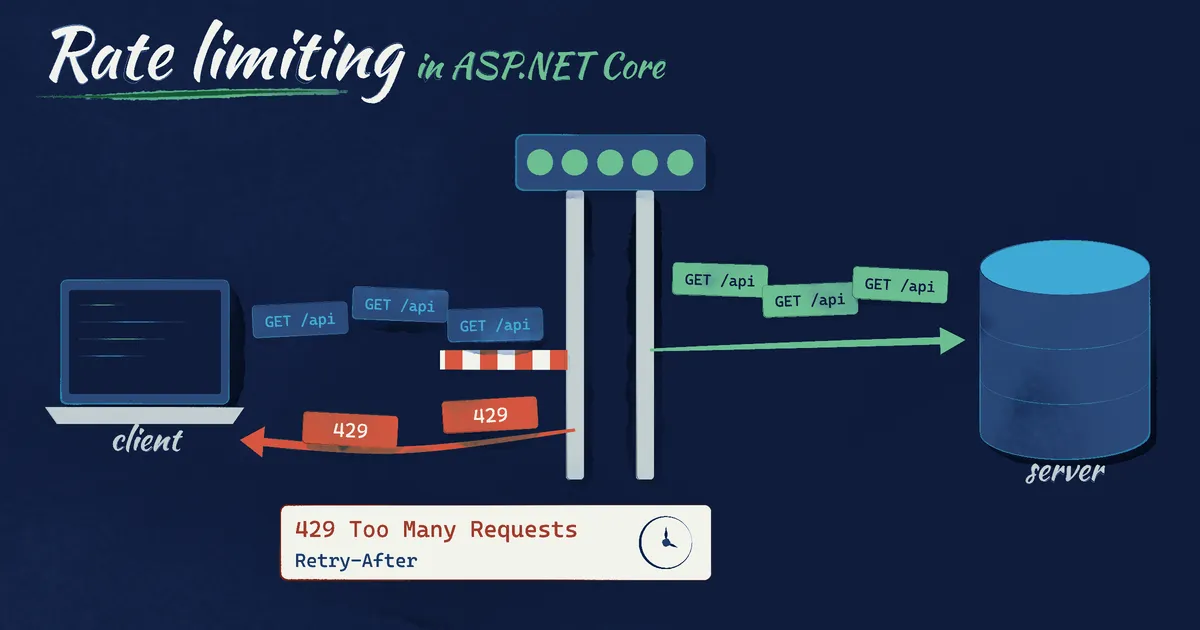
Rate limiting means putting a cap on how many requests a service accepts in a given amount of time, or at once. Whatever goes over the cap is rejected, or waits in a queue, before it reaches the expensive resource: the database, a third-party API, the CPU. ASP.NET Core has shipped it since .NET 7 as a middleware with four algorithms.
What it is for
The ASP.NET Core documentation gives six reasons: preventing abuse, sharing usage fairly between clients, protecting resources, adding a layer against denial of service, keeping performance up and controlling costs. A real-life example is a movie theater: the room has 100 seats per showing, and whoever finds it full waits for the next showing. The .NET blog uses that same theater to explain the first algorithm.
A per-client cap protects everyone else from what a single client does. Without it, a client with a badly written loop or a traffic spike takes the resource down for everyone else. It is the other side of the circuit breaker: the breaker protects the caller from a failing service; the rate limiter protects the receiver from too many calls.
Why it exists
Every resource handles a certain pace and no more. The announcement of rate limiting in .NET explains it with a database that can safely handle 1000 requests per minute: above that pace, the excess is better kept away from the database.
HTTP has had its own status code for this since April 2012. RFC 6585 defines 429 Too Many Requests: the user has sent too many requests in a given amount of time. The same RFC states that it does not define how the server identifies the user or how it counts requests: each server decides that. In .NET, built-in support was announced on July 13, 2022 and shipped with .NET 7 on November 8, 2022.
The four algorithms
All four live in System.Threading.RateLimiting. The last column comes from a test run with the repository's limits: 5 requests every 10 s for both windows, a bucket of 5 tokens with 1 new token every 2 s, and 2 concurrency slots.
| Algorithm | How it counts | Real-life example | In the test |
|---|---|---|---|
| Fixed window | N permits per window; when the next window starts, the counter goes back to zero | The movie theater: 100 seats per showing | 4 requests per second for 25 s: 15 accepted, 5 in each 10 s window |
| Sliding window | The window is split into segments; a segment's permits come back when that segment leaves the window | A venue that returns the ticket of whoever entered more than 10 s ago | The same load: 15 accepted |
| Token bucket | A bucket of N tokens; M are added every period, never above N, and each request spends one | Laundromat tokens that get recharged every so often | 4 per second for 20 s: 5 at once, then 1 every 2 s, 14 accepted out of 80 |
| Concurrency | At most N requests at the same time; no limit over time | Store fitting rooms, with 2 people inside | 2 slots and 500 ms of work, 10 per second for 5 s: 18 accepted out of 50 |
The first three limit how many requests get in per period; the concurrency limiter only limits how many are inside at once. That is why concurrency suits slow, expensive work, and the other three suit a pace.
The fixed window edge
The fixed window has a weak spot where one window ends and the next begins. With 5 permits every 10 s and a burst of 1 request at 0 s, 4 at 9.3 s and 5 at 10.3 s, the fixed window accepted all 10: 9 in about 1.01 s, with a cap of 5 per window. The sliding window, with the same pattern, rejected the 5 at 10.3 s.
One might expect that by 10.3 s the permit from second 0 had already left the sliding window and let one more request in. It did not, because the window moves one segment on the first tick of an internal 100 ms timer (DefaultPartitionedRateLimiter) after the period is up, and counts from that tick (SlidingWindowRateLimiter). At 10.3 s, that move had not happened yet. It is one run: with other timings, the result changes.
How it is done in ASP.NET Core
It is registered with AddRateLimiter and turned on with UseRateLimiter. With endpoint policies, UseRateLimiter goes after UseRouting, because until routing picks the endpoint the middleware does not know which policy applies. If the app calls UseStatusCodePagesWithReExecute, it goes before UseRouting and UseRateLimiter: the other way round, the limiter does not run for the re-executed request, even when the policy has no permits left. In the repository, authentication comes before the limiter so the client key can read the user:
// Endpoint policies are only visible to the rate limiter after routing has selected the endpoint.
app.UseRouting();
// Authentication runs first so the partitioner can read the signed-in user's id.
app.UseAuthentication();
app.UseRateLimiter();
app.UseAuthorization();
The configuration sets the rejection status code, the response and a global limiter per address, and declares the policies. This is the fixed window part; the other three follow the same pattern with AddSlidingWindowLimiter, AddTokenBucketLimiter and AddConcurrencyLimiter:
services.AddRateLimiter(options =>
{
    // The middleware default is 503; RFC 6585 defines 429 for "too many requests".
    options.RejectionStatusCode = StatusCodes.Status429TooManyRequests;
    options.OnRejected = RejectionWriter.WriteAsync;

    // Runs before any endpoint policy: one token bucket per client address.
    options.GlobalLimiter = PartitionedRateLimiter.Create<HttpContext, string>(context =>
        RateLimitPartition.GetTokenBucketLimiter(
            ClientKey.ForAddress(context.Connection.RemoteIpAddress),
            _ => new TokenBucketRateLimiterOptions
            {
                TokenLimit = Limits.GlobalBucketSize,
                TokensPerPeriod = Limits.GlobalTokensPerSecond,
                ReplenishmentPeriod = TimeSpan.FromSeconds(1),
                QueueLimit = 0,
            }));

    // The four built-in helpers below create ONE counter per policy, shared by every client.
    options.AddFixedWindowLimiter(Limits.FixedPolicy, limiter =>
    {
        limiter.PermitLimit = Limits.WindowPermits;
        limiter.Window = Limits.Window;
        limiter.QueueLimit = 0;
    });
With QueueLimit above 0, the request waits inside the server, with its connection open, until a permit frees up; it is 0 here so rejection is immediate. The global limiter runs before the endpoint policy. Each endpoint picks its policy with RequireRateLimiting, or with the [EnableRateLimiting] attribute on a controller. DisableRateLimiting removes it and skips the global limiter too:
app.MapGet("/per-client", (HttpContext context) =>
        Results.Ok(new { policy = Limits.PerClientPolicy, partition = ClientKey.For(context) }))
    .RequireRateLimiting(Limits.PerClientPolicy);

// Skips the global limiter and every endpoint policy: keep it for cheap endpoints that do not query the database.
app.MapGet("/health", () => Results.Ok(new { status = "healthy" }))
    .DisableRateLimiting();
One counter per client
The easiest mistake hides in the names. AddFixedWindowLimiter and its three siblings create a single counter per policy, shared by every client: once one client spends the 5 permits, the next one is rejected even if it sent nothing (RateLimiterOptionsExtensions). A counter per user or per address needs AddPolicy with a partition key (a partition is a separate counter for each key value):
// One fixed window counter per user, or per address for anonymous requests.
options.AddPolicy(Limits.PerClientPolicy, context =>
    RateLimitPartition.GetFixedWindowLimiter(
        ClientKey.For(context),
        _ => new FixedWindowRateLimiterOptions
        {
            PermitLimit = Limits.WindowPermits,
            Window = Limits.Window,
            QueueLimit = 0,
        }));
The key comes from ClientKey: user: plus a stable, unique user id (the NameIdentifier claim, or sub when it is missing) when there is a signed-in user, and the address otherwise. A signed-in user without that id is also counted by address. The display name does not work as a key: two people with the same name would share a counter. IPv6 addresses are grouped by their /64 prefix, because the last 64 bits are the interface identifier (RFC 4291) and a single host can change them (RFC 8981). With alice and bob sending 4 requests per second for 12 s, in parallel, each got 10 accepted, and neither counter touched the other. Partitions unused for 10 s are removed.
429 and Retry-After
RejectionStatusCode, or the status code inside OnRejected, which takes precedence.RFC 6585 asks the 429 response to explain the condition, allows a Retry-After header saying how long to wait, and forbids caches from storing it. The repository's OnRejected does all three, with a Problem Details body:
public static async ValueTask WriteAsync(OnRejectedContext context, CancellationToken cancellationToken)
{
    var http = context.HttpContext;
    http.Response.StatusCode = StatusCodes.Status429TooManyRequests;

    // RFC 6585, section 4: responses with the 429 status code must not be stored by a cache.
    http.Response.Headers.CacheControl = "no-store";

    // Fixed window and token bucket leases carry RetryAfter; sliding window and concurrency leases do not.
    if (context.Lease.TryGetMetadata(MetadataName.RetryAfter, out var retryAfter))
    {
        http.Response.Headers.RetryAfter = RetryAfterHeader.Format(retryAfter);
    }

    var problemDetails = http.RequestServices.GetRequiredService<IProblemDetailsService>();
    var written = await problemDetails.TryWriteAsync(new ProblemDetailsContext
    {
        HttpContext = http,
        ProblemDetails =
        {
            Status = StatusCodes.Status429TooManyRequests,
            Title = "Too many requests",
            Detail = "The rate limit for this resource was exceeded. Wait before sending a new request.",
        },
    });

    if (!written)
    {
        // No registered problem details writer accepts this request (with AddProblemDetails alone,
        // the Accept header rules out JSON), so fall back to plain text.
        http.Response.ContentType = "text/plain; charset=utf-8";
        await http.Response.WriteAsync("Too many requests.", cancellationToken);
    }
}
Retry-After carries a non-negative whole number of seconds or an HTTP date (RFC 9110). RetryAfterHeader rounds up, so it never asks for less waiting than the limiter reported, and a negative value goes out as 0. When the client sends Accept: text/html, the Problem Details writer does not write and the response goes out as plain text.
In .NET 10, that Retry-After is not always there and not always exact:
- Only the fixed window and the token bucket provide it. Sliding window and concurrency rejections arrive without
Retry-After. - In the fixed window it is the whole window, not the time left until it ends (FixedWindowRateLimiter). A fixed window 429 said
Retry-After: 10, and the next 200 response came 4.22 s later. In .NET 11 it is computed from the time left until the window changes, and the sliding window sends it too.
A client that retries after a 429 needs the retry to be safe, and for a POST that means an idempotency key.
What it does not cover
A limit shared by every instance needs a shared layer, such as an API gateway, or a limiter that keeps its counters in a shared store. Also:
- It is not DDoS protection. The documentation states it is not a complete solution for it. Also, the rejection comes after Kestrel has accepted the connection and read the request.
- Behind a reverse proxy, without forwarded headers, every client has the proxy's address and they all share a counter. Turning them on without restricting the trusted proxies lets each client pick its own partition, and partitioning by IP is exposed to address spoofing.
- Clients behind the same NAT, or the same IPv6 /64, share a counter. The other way round, a client with a larger IPv6 block, such as a /56 (256 /64 prefixes), can spread its requests across those /64s and get a counter in each. Grouping by /64 stops address changes inside one network, not someone who controls a whole block.
- When the endpoint policy rejects, the global limiter has already spent its permit (two in .NET 10, because the middleware asks once without waiting and once more with waiting), and time-based limiters do not give them back.
- The repository's
X-Demo-Userheader is for demonstration and only exists in Development: with it, anyone picks their own name. With 130 different names from a single address, all of them got past the per-user limiter; the per-address global limiter started cutting them off at request 81 and rejected 47 of the remaining 50.
The figures come from one run on ASP.NET Core 10.0.12 on Windows, with client and server on the same machine and demonstration limits. The literal outputs are in the repository's results/.
Conclusion
The ASP.NET Core middleware handles rate limiting for one instance in a few lines, but its defaults cannot be used as they are. Before taking it to production, three things need deciding: what gets counted (each client, not the whole policy), what gets answered (429 with a Retry-After that does not mislead) and where the counter lives (in each instance or in a shared layer). The repository shows each case with its own numbers before the API's limits are chosen.
References
- NippysoftLabs: rate-limiting-aspnet-core (github.com)
- Rate limiting middleware in ASP.NET Core (learn.microsoft.com)
- Announcing Rate Limiting for .NET (devblogs.microsoft.com)
- RFC 6585: Additional HTTP Status Codes (rfc-editor.org)
- RFC 9110: HTTP Semantics (rfc-editor.org)
- RateLimiterOptions.cs (ASP.NET Core 10.0.12) (github.com)
- FixedWindowRateLimiter.cs (.NET 10.0.12) (github.com)
- Configure ASP.NET Core to work with proxy servers and load balancers (learn.microsoft.com)
Tags
Share this post
Subscribe
Get the latest posts delivered right to your inbox.



Leave a comment