.NET Development
Runtime Async in .NET: what changes when the runtime runs async/await
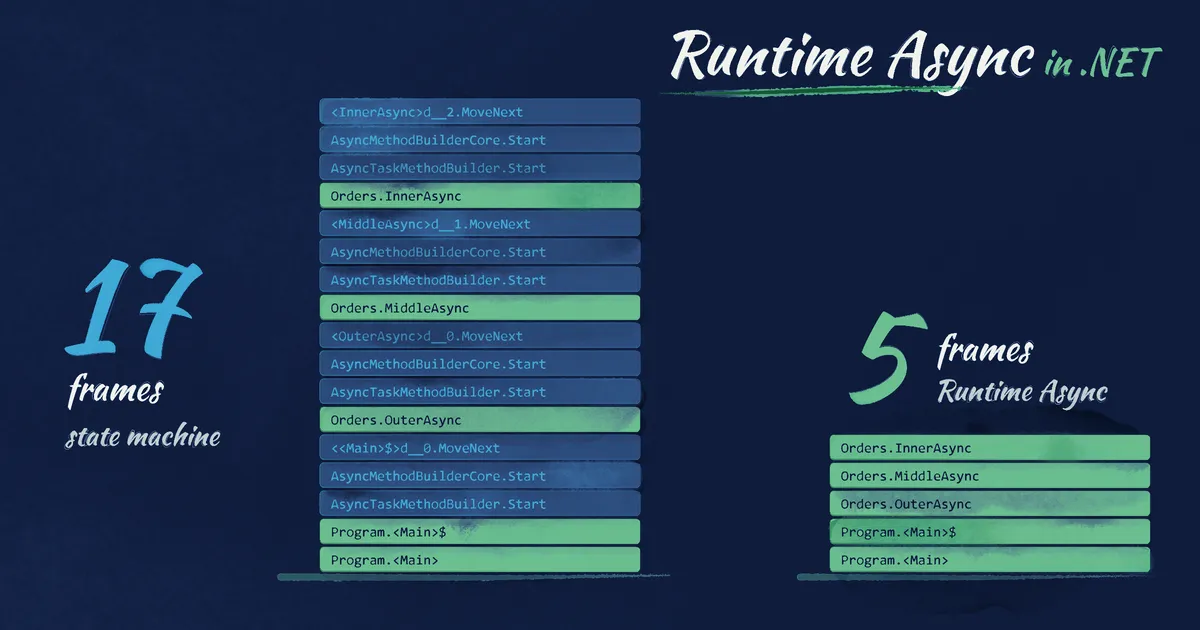
Runtime Async changes who executes async and await in .NET: suspending and resuming an asynchronous method stops being code that the C# compiler generates and becomes the runtime's job. It changes two traits of the classic model: every async method turns into a helper type nobody wrote, and the call stack shown by the debugger and by profilers fills up with frames from that machinery. The source code stays the same; what changes is what the compiler emits.
How async/await works with the state machine
In the classic model, still the default, Roslyn (the C# compiler) rewrites every async method as a state machine: a hidden type with a name like <InnerAsync>d__2 and a MoveNext method that advances from one await to the next. When the method suspends, that state has to be copied to the heap, the memory managed by the garbage collector, so it can continue later.
To the runtime, an async method compiled this way is ordinary code: all the suspension machinery lives inside the assembly. That machinery is visible in the live stack, the list of frames (one entry per method in progress) that new StackTrace() returns and that the debugger and profilers read. In a Release build, each method the developer wrote comes with three more: MoveNext, AsyncMethodBuilderCore.Start and AsyncTaskMethodBuilder.Start.
What changes when the runtime takes over
With Runtime Async, Roslyn stops generating the state machine. It compiles the method almost as written and sets a flag in the metadata: MethodImplOptions.Async, value 0x2000 in the specification; read through reflection, the same flag is MethodImplAttributes.Async. From there, the JIT (the compiler that turns intermediate code into machine code while the program runs) and the CoreCLR virtual machine suspend the method at each await and resume it later.
- It only applies to methods that return
Task,Task<T>,ValueTaskorValueTask<T>: the specification supports those four return types. - The developer does not see it in the syntax: the Roslyn design avoids exposing the feature at the user level.
Why it exists
The specification makes the case on performance: it argues that implementing this directly in the runtime can improve it. The .NET 11 runtime release notes add another reason: a shorter live stack, which helps profiling tools, diagnostic logging and the debugger's call stack window.
An assumed case: in an online store's API, OrderController calls OrderService, which calls PaymentClient, all three with await. With the state machine, whoever opens the stack in the debugger sees each of those methods wrapped in MoveNext and Start. With Runtime Async, the store's methods appear one under the other.
Status by version: from experiment to opt-in
Runtime Async is not new in .NET 11. In .NET 10 it shipped as an experiment for local testing, with the framework not recompiled. In .NET 11, Preview 1 turned on CoreCLR support by default, and since Preview 4 the runtime libraries are built with runtime-async=on. .NET 11 shipped on November 10, 2026 as an STS (standard term support) release, supported until November 14, 2028.
| Version | Status | How to turn it on |
|---|---|---|
| .NET 10 | Local experiment | EnablePreviewFeatures, the compiler's Features property, NoWarn for SYSLIB5007 and the DOTNET_RuntimeAsync=1 variable at run time |
| .NET 11, runtime and framework | On; System.Private.CoreLib and System.Net.Http already ship compiled this way, System.Text.Json does not | Nothing to do |
| .NET 11, project code | Opt-in, off by default | <Features>$(Features);runtime-async=on</Features> in a net11.0 project |
The .NET 10 setup has two traps. Without the NoWarn, the build fails with error SYSLIB5007, because AsyncHelpers is marked experimental. Without the environment variable, the program builds but does not start: it fails with TypeLoadException. In .NET 11 that variable is gone, and the Preview 4 notes state there is no longer a way to disable Runtime Async at the runtime level. Copying the Features property into a net10.0 project built with the .NET 11 SDK also fails with SYSLIB5007.
Features property in the .csproj, every async method in the project is still compiled as a state machine; what changed is the framework.How to turn it on and check what the compiler emitted
Learn documents the property for net11.0 projects, with no EnablePreviewFeatures. This minimal project, a trimmed version of the repository sample, turns it on and checks the result on the compiled binary.
RuntimeAsyncCheck.csproj:
<Project Sdk="Microsoft.NET.Sdk">
  <PropertyGroup>
    <OutputType>Exe</OutputType>
    <TargetFramework>net11.0</TargetFramework>
    <ImplicitUsings>enable</ImplicitUsings>
    <Nullable>enable</Nullable>
    <!-- Roslyn emits async methods that return Task or ValueTask as runtime-async methods. -->
    <Features>$(Features);runtime-async=on</Features>
  </PropertyGroup>
</Project>Program.cs:
using System.Diagnostics;
using System.Reflection;
using System.Runtime.CompilerServices;

MethodInfo inner = typeof(Orders).GetMethod(nameof(Orders.InnerAsync))!;
// MethodImplAttributes.Async (0x2000): suspension and resumption are left to the runtime.
bool runtimeAsync = (inner.MethodImplementationFlags & MethodImplAttributes.Async) != 0;
// Roslyn attaches this attribute when it generates a state machine for the method.
bool stateMachine = inner.GetCustomAttribute<StateMachineAttribute>() is not null;
Console.WriteLine($"InnerAsync: runtime async={runtimeAsync}, state machine={stateMachine}");

await Orders.OuterAsync();

public static class Orders
{
    public static async Task OuterAsync() => await MiddleAsync();

    public static async Task MiddleAsync() => await InnerAsync();

    public static async Task InnerAsync()
    {
        // The stack is captured here, so PrintStack itself is not one of the frames.
        PrintStack("before await", new StackTrace());
        await Task.Yield();
        PrintStack("after await", new StackTrace());
    }

    // Prints the frames of a live stack captured by the caller.
    private static void PrintStack(string label, StackTrace trace)
    {
        StackFrame[] frames = trace.GetFrames();
        Console.WriteLine($"Live stack {label}: {frames.Length} frames");
        foreach (StackFrame frame in frames)
        {
            MethodBase? method = frame.GetMethod();
            Console.WriteLine($"   at {method?.DeclaringType?.Name}.{method?.Name}");
        }
    }
}
The check reads two things from the compiled method. The MethodImplAttributes.Async flag, which means the runtime handles suspension and resumption, and the StateMachineAttribute attribute, which marks a state machine method. The binary tells which model was used, whatever the .csproj seems to say. With the property on, the output is:
InnerAsync: runtime async=True, state machine=False
Live stack before await: 5 frames
   at Orders.InnerAsync
   at Orders.MiddleAsync
   at Orders.OuterAsync
   at Program.<Main>$
   at Program.<Main>
Live stack after await: 6 frames
   at Orders.InnerAsync
   at RuntimeAsyncTask`1.DispatchContinuations
   at ThreadPoolWorkQueue.Dispatch
   at WorkerThread.WorkerDoWork
   at WorkerThread.WorkerThreadStart
   at Thread.StartCallback
Without the Features line, the same program prints runtime async=False, state machine=True and a stack of 17 frames before the await in Release (dotnet run -c Release); in Debug it is 13. Going back to the classic model only takes removing that line.
What the check does not cover
async voidmethods andIAsyncEnumerable<T>iterators keep their state machine even with the property on.- A method that returns
Taskwithout beingasyncshowsFalsefor both: it has no suspension of its own in either model. - An
asynclambda compiles to a separate method: the flag is on that generated method, not on the one that contains it. GetMethod(name)throwsAmbiguousMatchExceptionwhen the name is overloaded, and returnsnullfor a private method unlessBindingFlags.NonPublicis passed; with the sample's!, thatnullends in aNullReferenceException.- Roslyn adds the attribute: an obfuscator or hand-written IL could remove it.
results/.What developers gain, measured
In a chain of three nested async methods, the live stack before the first await holds 17 frames with the state machine and 5 with Runtime Async, the same ones the animation above shows. After await Task.Yield(), the method continues on a thread pool thread and the stack goes from 10 to 6 frames: with the state machine, five of those frames belong to AsyncStateMachineBox and the execution context; with Runtime Async, just one. In both models, once resumed, the calling methods are no longer on the stack. The visible gain is in the live stack that profilers and the debugger read; exception traces already looked the same. The same program confirms it: ex.StackTrace gives the same four lines in both models, as Learn says it would. When diagnosing thread pool starvation from stack dumps, five frames read faster than seventeen.
Deep async recursion
With an async recursion that does not suspend until the last level, the state machine reached 3,000 levels and overflowed the stack at 5,000. Runtime Async reached 10,000 and overflowed at 100,000. Those numbers hold for the main thread on Windows x64: they depend on the thread's stack size. A stack overflow cannot be caught with try/catch and, by default, terminates the process, so the extra headroom is no license for unbounded recursion.
Allocations: both directions
With BenchmarkDotNet and [MemoryDiagnoser], the bytes allocated per call were:
| Chain of three calls | State machine | Runtime Async |
|---|---|---|
| Completes without suspending | 0 B | 0 B |
Task<int> that suspends | 277 B | 304 B |
ValueTask<int> that suspends | 319 B | 304 B |
The chain that completes without suspending allocates nothing in either model. Timings are not published: with three iterations, the error margin BenchmarkDotNet reports is of the same order as the difference between models.
A method marked [AsyncMethodBuilder(typeof(PoolingAsyncValueTaskMethodBuilder<>))] also becomes runtime async when the property is on, and the pooling builder is no longer used: in the repository's measurement, with a direct await, that method went from 0 to 56 bytes per call that suspends.
Task<int> chain allocated more with Runtime Async and the ValueTask<int> chain allocated less. Before turning it on in production, it pays to measure the application's hot paths with BenchmarkDotNet.What stays the same and what is left out
Code is written the same way. In the repository's edge-case probe these give the same output in both models: await inside catch and finally, ConfigureAwait(false), AsyncLocal<T>, cancellation, Task.WhenAll with two failures, a Span<T> used before the await and a virtual override. The rules for exceptions and cancellation with await still apply.
Dependencies do not change with the project: each assembly keeps the model it was compiled with. The Roslyn design acknowledges it: the compiler has no way to know whether a method from a referenced assembly was compiled with Runtime Async. In .NET 11, System.Text.Json has no flagged method and keeps its state machines, because the dotnet/runtime build leaves out the libraries that also ship as a separate NuGet package; a NuGet package compiled with the classic model stays that way even if the project that uses it turns the property on. It also changes things for code that detects async methods through reflection by looking for AsyncStateMachineAttribute: a method compiled with Runtime Async does not carry that attribute.
Left out are Mono, which is not supported, and the platforms where the dotnet/runtime build does not turn it on: browser, WASI, Android and Apple mobile.
Conclusion
Runtime Async moves the async machinery from the compiler to the runtime. In .NET 11 the runtime is ready and part of the framework already uses it; project code adopts it with one line in the .csproj. The measured gain is a readable live stack and more headroom for deep recursion; allocations move little and in both directions. This article does not measure whether it is faster: with three iterations, the time difference stayed within the margin of error. To decide for a given project, the practical path is to turn it on in a branch, open the stack in the usual profiler and measure the hot paths. Teams moving to .NET 11 can try it once the upgrade is done.
Measurements: Release build, Windows 11 x64, AMD Ryzen 5 3600, SDK 11.0.100 with runtime 11.0.0, and SDK 10.0.401 with runtime 10.0.12 for .NET 10. BenchmarkDotNet 0.15.8, in-process ShortRun job.
References
- NippysoftLabs: runtime-async-dotnet (github.com)
- What's new in .NET 11 runtime (learn.microsoft.com)
- runtime/docs/design/specs/runtime-async.md at main · dotnet/runtime (github.com)
- roslyn/docs/compilers/CSharp/Runtime Async Design.md at main · dotnet/roslyn (github.com)
- .NET Runtime-Async Feature · Issue #109632 · dotnet/runtime (github.com)
- core/release-notes/11.0/preview/preview4/runtime.md at main · dotnet/core (github.com)
- How Async/Await Really Works in C# (devblogs.microsoft.com)
Tags
Share this post
Subscribe
Get the latest posts delivered right to your inbox.



Leave a comment